




















The Kendo Tournament Manager NG is a comprehensive tool designed to efficiently manage all your kendo tournament data in one convenient location. It caters to tournaments of varying sizes, offering versatility to accommodate any type of event for your kendo club. Drawing on 15 years of experience with different fighting structures, this tool aims to provide flexibility that serves your club's needs effectively.
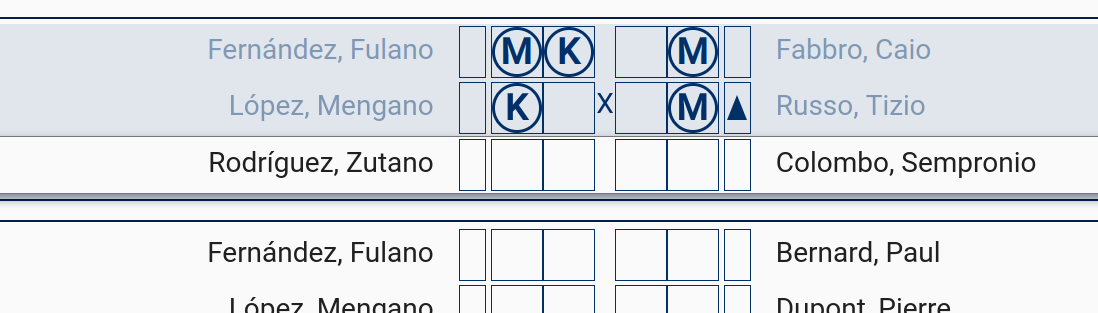
A significant upgrade from the previous Kendo Tournament Generator [1] [2], this tool has been rebuilt entirely with a focus on modern technologies. The new architecture allows for web deployment instead of being limited to desktop applications. This shift brings advantages like enhanced compatibility across different devices, enabling access from any Android or iOS device through a web browser. Moreover, it enhances scoring synchronization among multiple devices by centralizing all data in the cloud.
If you are seeking a desktop application, please visit the Kendo Tournament Generator page for more information.
But if you are in need of a more professional online tool, the project described here may be exactly what you are searching for. If you are interested in discovering the capabilities of this tool for your tournaments, you can explore the wiki for details on its features and customization choices. Alternatively, for practical illustrations, you can directly check out a few description examples provided.
- Streamline the creation and execution of championships, leagues, and tournaments in multiple formats suitable for both professional and amateur levels.
- Supports six distinct tournament types out of the box: Championship (Senshuken), League (Saotori shiai), Kachinuki, Loop, Senbatsu, and Dethrone the King — each with configurable options.
- Handle any number of teams and participants, from small club events to large multi-club championships.
- Manage multiple simultaneous shiaijos with separate devices assigned to each fighting area.
- Prevent scoring errors by providing instant tracking and automated point counting, including automatic hansoku (fault penalties) assignment.
- Scores are synchronized across all connected devices in real time via WebSockets, so every shiaijo sees the latest data instantly.
- Handle tie-breaking (daihyōsen) matches automatically when teams share the same ranking.
- Built-in match timer with configurable duration per tournament.
- Register clubs and participants once; reuse them across any number of tournaments.
- Assign participants to roles: competitor, referee, volunteer, and more.
- Upload participant photos for use in score panels and printed accreditations.
- Bulk-import clubs and participants from CSV files for fast onboarding.
- Track participants' progress through detailed per-tournament and global statistics: scores achieved, scores received, wins, losses, time, aggressiveness, and more.
- Generate global participant rankings and club rankings, filterable by time period and downloadable as PDF.
- An Achievements system with hidden goals (normal, bronze, silver, gold) to encourage participation from all club members, regardless of skill level.
- Generate printable PDF documents: club lists, team lists, group lists, match sheets, match results, team rankings, competitor rankings, participant accreditations, and diplomas.
- Export PDF files directly from the browser using client-side generation.
- Role-based access control (RBAC) with administrator and standard user roles.
- Optional guest access via QR codes: generate a tournament QR code that any spectator can scan to follow live scores from their mobile device — without needing an account.
- Optional competitor access via QR codes: share a personal long-lived token with club members so they can review their own statistics.
- Projector/referee mode: hide all controls and show a clean scoreboard suitable for a projected display or second screen.
- Fully responsive web application accessible from any device with a modern browser.
- Night mode for comfortable use in darkened tournament venues.
- Internationalisation (i18n) with community translations hosted on Weblate — currently supporting Spanish, English, Italian, and more.
- Colour and team-position customisation on the score panel to match the referee's viewpoint.
- Keyboard shortcuts for fast score entry during live matches.
- Fully documented REST API (OpenAPI 3 / Swagger UI) available at
/kendo-tournament-backend/swagger-ui/index.htmlonce the backend is running. - JWT-based authentication enables third-party integrations and custom tooling.
For a complete list of features and usage examples, visit the wiki.
The application follows a standard three-tier architecture deployed as Docker containers:
┌─────────────────────────────┐
│  Browser (any device)       │
│  Angular 15 SPA             │
└────────────┬────────────────┘
             │ HTTPS / WebSockets
┌────────────▼────────────────┐
│  Traefik reverse proxy      │  ← automatic TLS via Let's Encrypt
│  (kendo-tournament-rproxy)  │
└────────────┬────────────────┘
             │ HTTP (internal)
     ┌───────┴──────┐
     │              │
┌────▼────┐  ┌──────▼───────┐
│Frontend │  │  Backend     │
│ (Nginx) │  │ Spring Boot  │
└─────────┘  └──────┬───────┘
                    │ JDBC
             ┌──────▼───────┐
             │  Database    │
             │(PostgreSQL / │
             │   MySQL)     │
             └──────────────┘
| Layer | Technology | Docker Hub image |
|---|---|---|
| Frontend | Angular 15, served via Nginx | softwaremagico/kendo-tournament-manager-frontend |
| Backend | Java 17, Spring Boot 3, REST + WebSockets | softwaremagico/kendo-tournament-manager-backend |
| Reverse proxy | Traefik (automatic Let's Encrypt TLS) | softwaremagico/kendo-tournament-manager-rproxy |
| Database | PostgreSQL 14 (default) or MySQL 8 | official image |
For detailed guidance on the installation process, please refer to the wiki. But for your convenience, here is an overview:
Deploying the application as a docker container is the best option. If you prefer deploying it as a Docker container, refer to the guidelines provided in this project's documentation. Using Docker is recommended for deployment due to its ease of use once you are familiar with it. Remember that you can also use the official images from docker hub:
Please, check the wiki for further information about how to customize the configuration.
To begin, download your desired release from this git project. You will receive two distinct files, one for the frontend and another for the backend.
For the frontend component, any familiar web server such as Apache or Nginx can be used.
Simply extract the file kendo-tournament-frontend.zip onto your server as a standard web page.
The backend is distributed as a standalone JAR file. Running this application requires Java JRE 17 or higher. You can manually execute it by entering the following command:
java -jar kendo-tournament-backend.jar
It's likely that some configuration adjustments may be necessary for the application. To do so, utilize any ZIP tool to access the jar file and modify 'BOOT-INF/classes/application.properties' according to instructions provided in this Readme. Remember to repackage any changes back into the JAR file for them to take effect.
A database server installation is essential.
While MySQL Server is set as default, you have the option to install any preferred database system.
If opting for a different database engine, ensure to include its required connector within /BOOT-INF/lib/ in the
backend JAR.
Once your choice of database server is installed, configure application.properties
based on guidelines listed in this Readme to align with your specific database properties.
Remember again to repackage any changes back into the JAR file for them to take effect.
For example, to configure the settings for using a PostgresSQL server, you will need to set up these steps:
-
Download the connector postgresql-X.X.X.jar and place it in the
/BOOT-INF/lib/folder within the JAR file. -
Configure the settings according to your database preferences.
spring.kendo.datasource.platform=postgresql
spring.jpa.properties.hibernate.dialect=org.hibernate.dialect.PostgreSQLDialect
spring.kendo.datasource.jdbc-url=jdbc:postgresql://kendo-tournament-database:5432/postgres
spring.kendo.datasource.username=<your user>
spring.kendo.datasource.password=<your password>
- Upon successful connection of the backend to the database, all necessary database structures will be automatically generated.
For the complete project, please access it here.
The project is divided into two parts: frontend and backend, each requiring separate execution.
The frontend is created using Angular. Detailed instructions on how to use and run the frontend can be found here.
The backend component is written in Java. Instructions for compiling and running the backend are available in this Readme file. Make sure to carefully review the documentation as there are default keys that should be modified for security purposes.
The backend requires a database for data persistence. You have flexibility in choosing your preferred database provider. Refer to the documentation for guidance on configuring your chosen database engine.
The application has been tested on a Raspberry Pi 3 model B with 1 GB of RAM and has shown excellent performance for small to medium-sized events. For larger events or high-availability deployments, it is recommended to use more specialized hardware or a cloud hosting solution.
Designed as a web application, it can be accessed by any device with a modern browser. The user experience is optimised for desktop environments and tablets, featuring a responsive design that adapts well to most devices. Using mobile phones is not recommended due to screen-size limitations that make score entry difficult.
Contributions are welcome! Please read the contribution guidelines before submitting a pull request.
If you find a bug or have a feature request, please open an issue.
Translations are managed through Weblate. If you would like to add or improve a translation, please contribute there.
This project is licensed under the GNU Affero General Public License v3.0 (AGPL-3.0). See the LICENSE file for details.
For instructions on using the application, please visit the wiki. There, you will find comprehensive examples for various types of tournaments and guidance on how to configure them.
The first time you attempt to access the application, there will be no registered users. You can enter any username and password to log in, and the system will immediately create an administrator account based on the information provided. This feature is only available if there are no users in the system, so it will be disabled as soon as you create the first administrator. Please make a note of the generated username and password and store it in a safe place.
There are various ways to contribute to this project:
- You can show support by starring the project or reporting issues.
- If you are a programmer, you can add new features or fix bugs.
- Translating the application into different languages is also appreciated.
- Any suggestions for improving the design are welcome.
To contribute code to Kendo Tournament Manager NG, please follow these steps:
Fork this repository.
Create a branch: git checkout -b <branch_name>.
Make your changes and commit them: git commit -m '<commit_message>'
Push to the original branch: git push origin <project_name>/<location>
Create the pull request.
Alternatively, refer to GitHub's documentation on creating a pull request
If you are not a programmer but would like to have this software available in your language, you can easily contribute to the translations through Weblate. Weblate allows you to enhance existing translations, address issues, or even introduce new languages if desired. No programming skills are required, only a willingness to assist. To begin translating, please visit this link for more information.
Should you wish to contact me, feel free to reach out at the following email
address: 
Please note that this project is licensed under the AGPL License v3.0. Kindly review it before using the application.