Enterprise-Grade Foundation. One config. i18n, RBAC, Google OAuth, SEO & More (built to scale)



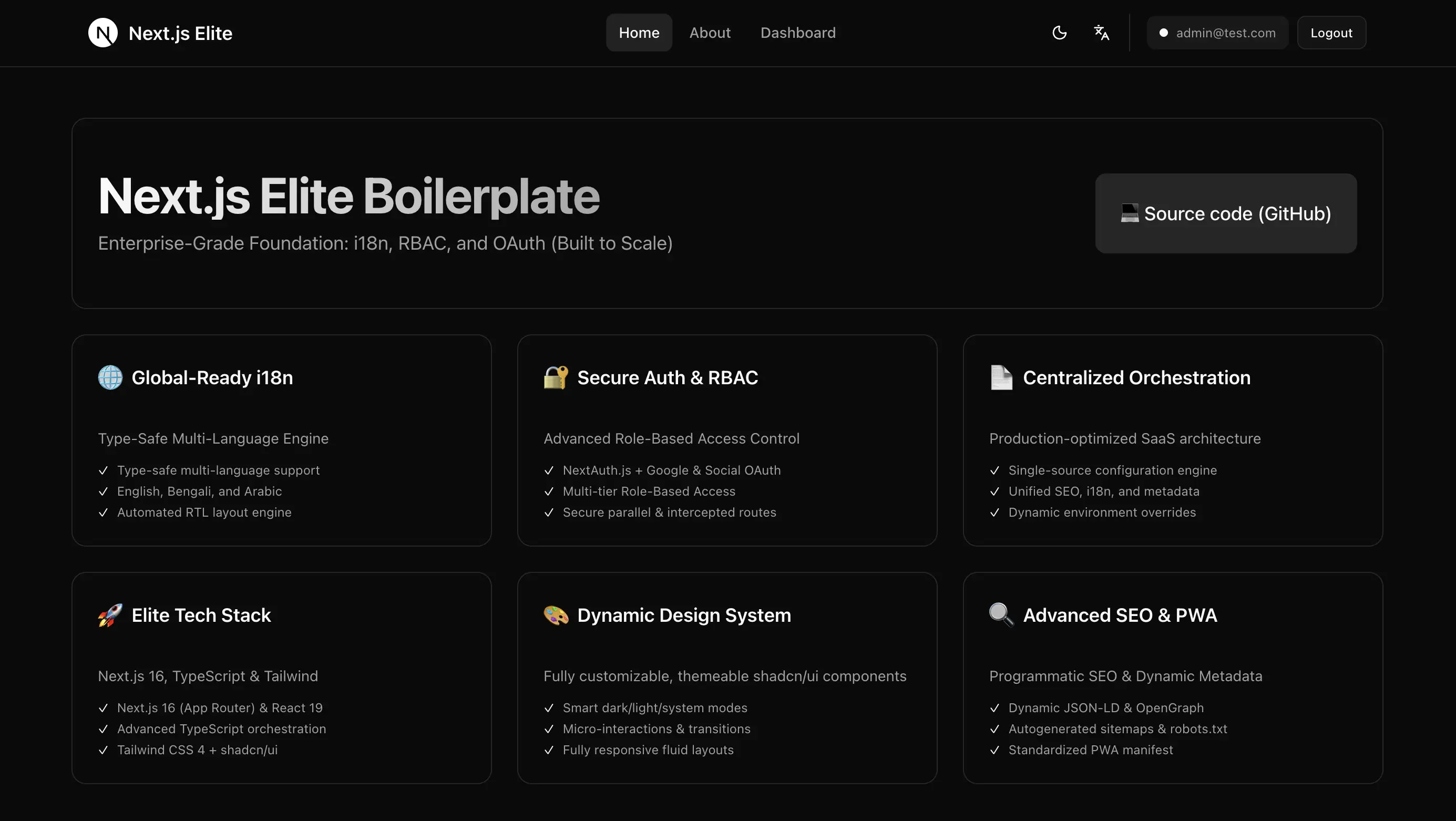
Most Next.js starters leave you wiring from scratch. This boilerplate prioritizes app-ready defaults: A production-ready Next.js SaaS Boilerplate with Type-safe i18n (6 languages) + NextAuth, Google OAuth + RBAC with parallel routes + SEO (sitemap, robots, manifest) + Theme + ESLint + Prettier + Vitest + Playwright.
- Central config - Single app-main-meta-data.json for app name, SEO, languages, organization, theme; drives metadata, sitemap, robots, manifest
- Type-safe i18n (6 languages) - English, বাংলা, العربية, Français, Español, and 简体中文 with RTL. Example:
t("navigation.home")is type-checked (invalid keys fail at compile time) - Role-based access control - Next.js 16 parallel routes for User and Admin. Example:
app/(protected)/@admin/dashboardandapp/(protected)/@user/dashboardboth map to/dashboard, so roles stay hidden from the URL - NextAuth.js - Auth with optional Google OAuth; admin role via
AUTH_ADMIN_EMAILS - SEO - Open Graph, Twitter Card, JSON-LD, multi-language meta, dynamic sitemap, canonical URLs
- next-themes - Dark mode with system preference and manual toggle
- ESLint and Prettier - Lint and format (Tailwind plugin, format on save in
.vscode) - Vitest and React Testing Library - Unit and component tests
- Playwright - E2E tests in
e2e/; optional WebKit-only for lower disk use - GitHub Actions - Check workflow (lint, format, test, build) and Playwright E2E workflow
- Health check -
GET /api/healthreturns{ status: "ok" }for load balancers and Kubernetes probes - shadcn/ui - Accessible, customizable components (Radix + CVA)
- Tailwind CSS v4 - Utility-first styling
- TypeScript - Strict mode for type safety
- Next.js 16 - App Router, Server Components, recommended stable 16.x
Deploy with Vercel by clicking the button below:
- Node.js 18.17 or later
- npm, yarn, pnpm, or bun
This boilerplate uses Next.js 16 (16.1.6) for stability and security. Stay on the latest 16.x patch for security updates.
-
Clone the repository
git clone https://github.com/salmanshahriar/Nextjs-Elite-Boilerplate.git cd Nextjs-Elite-Boilerplate -
Install dependencies
npm install
# or
yarn install
# or
pnpm install
# or
bun install
-
Run the development server
npm run dev
-
Open your browser at
http://localhost:3000
- Copy
.env.exampleto.envand setNEXT_PUBLIC_APP_URLif you need to override the site URL (e.g. in production). - Edit
src/shared/lib/config/app-main-meta-data.json— main config for app name, domain, SEO, languages, organization, and theme. Sitemap, robots, and manifest are generated from it. - For Google sign-in: set
NEXTAUTH_URL,NEXTAUTH_SECRET,GOOGLE_CLIENT_ID,GOOGLE_CLIENT_SECRETin.env, then setNEXT_PUBLIC_GOOGLE_AUTH_ENABLED=true. See Google OAuth setup below.
.
├── src/
│   ├── app/                     # App Router pages and layouts
│   │   ├── (protected)/         # Authenticated area with RBAC
│   │   │   ├── @admin/          # Admin dashboard
│   │   │   ├── @user/               # User dashboard
│   │   │   └── layout.tsx       # Chooses segment based on role
│   │   ├── api/                 # API routes
│   │   │   ├── auth/            # NextAuth routes
│   │   │   └── health/          # Health check endpoint
│   │   ├── layout.tsx           # Root layout (providers, SEO, theme, i18n)
│   │   ├── error.tsx            # Global error boundary
│   │   ├── not-found.tsx        # 404 page
│   │   ├── manifest.ts          # Web manifest from config
│   │   ├── robots.ts            # robots.txt from config
│   │   └── sitemap.ts           # Sitemap from config
│   └── shared/                  # Shared logic and components
│       ├── components/          # Reusable React components
│       ├── hooks/               # Selection of custom React hooks
│       ├── layout/              # Layout components (header, footer, etc.)
│       ├── lib/                 # Core logic, config, and utils
│       │   ├── auth/            # Auth context, NextAuth options, types
│       │   ├── config/          # Central config (app-main-meta-data.json)
│       │   └── i18n/            # i18n config, hooks, types
│       └── ui/                  # shadcn/ui components
├── locales/                     # Translation files (en, bn, ar, fr, es, zh)
├── e2e/                         # Playwright E2E tests
├── .github/workflows/           # CI (check.yml, playwright.yml)
└── public/                      # Static assets (favicon, og image, etc.)
Edit src/shared/lib/config/app-main-meta-data.json to customize app name, domain, SEO, languages, organization, theme. It drives metadata, sitemap, robots, manifest, and i18n locales.
{
  "appName": "Next.js Elite Boilerplate",
  "appType": "Enterprise SaaS Starter",
  "tagline": "Enterprise-Grade Foundation: i18n, RBAC, and OAuth (Built to Scale)",
  "title": "Next.js Elite: The Ultimate SaaS Starter with i18n & RBAC",
  "description": "Production-ready Next.js boilerplate with multi-language support (i18n) and role-based access control (RBAC)",
  "locale": "en_US",
  "language": "en-US",
  "domain": "https://yourdomain.com",
  "canonicalPath": "/",
  "applicationCategory": "WebApplication",
  "audience": "Developers, Businesses",
  "keywords": ["nextjs", "i18n", "rbac", "boilerplate", "multilanguage"],
  "features": ["Multi-language Support", "Role-Based Access Control", "Production Ready"],
  "languages": {
    "supported": ["en", "bn", "ar", "fr", "es", "zh"],
    "default": "en",
    "locales": { "...": "..." }
  },
  "organization": { "...": "..." },
  "contact": { "...": "..." },
  "social": { "...": "..." },
  "images": { "...": "..." },
  "icons": { "...": "..." },
  "theme": { "...": "..." },
  "pricing": { "...": "..." },
  "manifest": "/manifest.webmanifest"
}- Add
src/shared/lib/config/app-main-meta-data.jsonentry:- Append the language code to
languages.supported(e.g."es"). - Add an entry under
languages.locales(e.g."es": { "code": "es", "name": "Spanish", "nativeName": "Español", "locale": "es_ES", "direction": "ltr" }).
- Append the language code to
- Create
locales/es.json(or your code) with the same structure aslocales/en.json. - In
src/shared/lib/i18n/get-translations.ts, import the new file and add it to thetranslationsobject. Add the new key to theTranslationKeysunion insrc/shared/lib/i18n/types.tsif you use strict keys.
Type-safe usage example:
const { t } = useTranslations(messages);

t("navigation.home");
// t("navigation.homer"); // invalid key (type error)- Google Cloud Console: Go to APIs & Credentials and create an OAuth 2.0 Client ID (Web application).
- Authorized redirect URI: Add
http://localhost:3000/api/auth/callback/google(dev) and your production URL (e.g.https://yourdomain.com/api/auth/callback/google). .env: SetGOOGLE_CLIENT_ID,GOOGLE_CLIENT_SECRET,NEXTAUTH_URL(e.g.http://localhost:3000), andNEXTAUTH_SECRET(e.g.openssl rand -base64 32). SetNEXT_PUBLIC_GOOGLE_AUTH_ENABLED=trueto show the Google sign-in button.- Admin role: Optionally set
AUTH_ADMIN_EMAILS=admin@yourdomain.com(comma-separated) so those Google accounts get the admin role.
-
Create a new parallel route folder:
mkdir -p app/(protected)/@moderator/dashboard
-
Add your role-specific pages inside the folder
-
Update
src/app/(protected)/layout.tsxto handle the new role:if (currentUser?.role === "moderator") return moderator;
Your URL stays clean. Even with parallel routes like app/(protected)/@admin/dashboard, the user still visits /dashboard (the role is not exposed in the path).
- Unit / component: Vitest + React Testing Library. Run
npm run testornpm run test:watch. - E2E: Playwright in
e2e/. Runnpm run e2e(starts dev server automatically). Usenpm run e2e:uifor the UI. - E2E with Safari only: To save disk space, install only WebKit and run with Safari:
npx playwright install webkitthennpm run e2e:webkit. - Coverage:
npm run test:coverage.
- GitHub Actions:
.github/workflows/check.ymlruns on push/PR: lint, Prettier check, unit tests, build..github/workflows/playwright.ymlruns E2E (Chromium, Firefox, WebKit). - Prettier:
prettier.config.js+ Tailwind plugin.npm run prettierto check,npm run prettier:fixto fix. - Editor:
.vscode/settings.jsonenables format on save and ESLint fix on save.
- Health check:
GET /api/healthreturns{ status: "ok" }for load balancers and Kubernetes probes.
| Command | Description |
|---|---|
npm run dev |
Start development server |
npm run build |
Build for production |
npm run start |
Start production server |
npm run lint |
Run ESLint |
npm run lint:fix |
Fix ESLint errors |
npm run test |
Run unit tests (Vitest) |
npm run test:watch |
Run unit tests in watch mode |
npm run test:coverage |
Run unit tests with coverage |
npm run e2e |
Run Playwright E2E tests |
npm run e2e:ui |
Run Playwright with UI |
npm run e2e:webkit |
Run E2E in WebKit (Safari) only |
npm run prettier |
Check formatting |
npm run prettier:fix |
Fix formatting |
- Framework: Next.js 16.1.6 (App Router)
- Language: TypeScript
- Auth: NextAuth.js (Google OAuth, JWT session)
- Styling: Tailwind CSS v4
- Components: shadcn/ui
- Internationalization: Type-safe i18n (locales from config)
- Code Quality: ESLint, Prettier, TypeScript strict mode
- Testing: Vitest, React Testing Library, Playwright
- Icons: Lucide React
Your boilerplate is ideal for:
- ✅ SaaS applications with multiple user roles
- ✅ International apps (especially with RTL needs)
- ✅ Startups needing fast, professional launches
- ✅ Enterprise projects with auth/role requirements
May not be suitable for:
- ❌ Simple landing pages (over-engineered)
- ❌ Projects with highly custom authentication requirements
- ❌ Applications without internationalization needs
Contributions are welcome! Please follow these steps:
- Fork the repository
- Create a feature branch (
git checkout -b feature/amazing-feature) - Commit your changes (
git commit -m 'Add amazing feature') - Push to the branch (
git push origin feature/amazing-feature) - Open a Pull Request
Please ensure your code follows the existing ESLint configuration and includes appropriate documentation.
This project is licensed under the MIT License - see the LICENSE file for details.
[ If this boilerplate saved you time, a star helps more devs discover it ]
