


A production-ready template for creating Go services following clean architecture principles. This template provides a robust foundation for building scalable, maintainable, and well-tested microservices in Go.
Building production-grade microservices requires more than just writing code. You need:
- A solid architectural foundation
- Security best practices
- Comprehensive testing
- Performance optimization
- Developer-friendly tooling
This template provides all these essentials out of the box, saving you weeks of setup time and helping you follow established best practices.
- Clean Architecture with detailed examples
- JWT Authentication & Role-Based Access Controlx
- End-to-End Encryption for requests/responses
- PostgreSQL with Prisma ORM
- Graceful Shutdown
- Structured Logging with Logrus
- Hot Reload Development
- Docker with Docker Compose
- Make commands for development
- Comprehensive test examples
- Swagger documentation
- Rate Limiting
# Clone the repository
git clone https://github.com/ibhanu/go-template.git

# Create your project
mkdir -p your-project && cd your-project
cp -r ../go-clean-template/* .
rm -rf .git && git init# Copy and edit environment variables
cp .env.example .env
# Edit .env with your settings:
# - Database credentials
# - JWT secret
# - API configurations# Install dependencies and setup database
make setup
# Generate Prisma client
make prisma-generate
# Start development server with hot reload
make devVisit http://localhost:8080/swagger/ to explore the API.
.
├── internal/                 # Application code
│   ├── domain/              # Enterprise business rules
│   │   ├── entity/          # Business entities
│   │   ├── repository/      # Repository interfaces
│   │   └── constants/       # Domain constants
│   ├── application/         # Application business rules
│   │   └── usecase/        # Use case implementations
│   ├── infrastructure/      # External tools and frameworks
│   │   ├── config/         # Configuration
│   │   ├── middleware/     # HTTP middleware
│   │   ├── repository/     # Repository implementations
│   │   └── server/        # HTTP server setup
│   └── interface/          # Interface adapters
│       └── handler/        # HTTP handlers
├── prisma/                 # Database schema and client
├── scripts/               # Utility scripts
└── docs/ # Documentation-
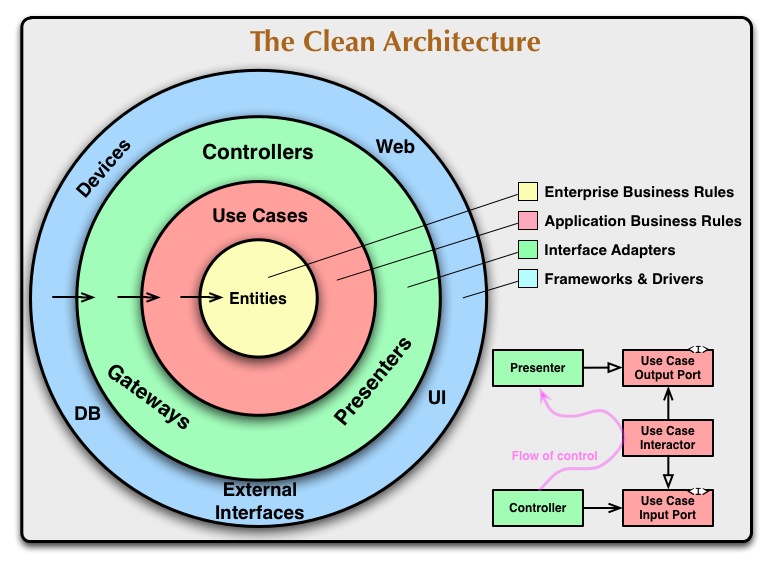
Domain Layer (innermost)
- Contains enterprise business rules
- Pure Go without external dependencies
- Defines interfaces and entities
-
Application Layer
- Implements use cases
- Orchestrates domain objects
- Contains business logic
-
Interface Layer
- Adapts data between layers
- Handles HTTP requests
- Manages serialization
-
Infrastructure Layer (outermost)
- Implements interfaces
- Integrates external services
- Manages technical concerns
# Development
make setup           # Initialize project
make dev             # Run with hot reload
make build           # Build binary
make run             # Run binary
make clean           # Clean build files

# Testing
make test            # Run all tests
make test-coverage   # Run tests with coverage
make test-race       # Run tests with race detection
make benchmark       # Run benchmark tests

# Code Quality
make lint           # Run linters
make fmt            # Format code
make vet            # Run go vet
make cyclo          # Check cyclomatic complexity

# Database
make db-init        # Initialize database
make db-migrate     # Run migrations
make prisma-generate # Generate Prisma client
make prisma-studio  # Open Prisma Studio

# Docker
make docker-build   # Build image
make docker-push    # Push to registry
make deploy         # Deploy with docker-compose
make docker-logs # View container logs# Testing
make test-integration # Run integration tests
make test-e2e # Run end-to-end tests
make test-stress # Run stress tests
# Documentation
make docs # Generate documentation
make swagger # Generate Swagger specs
# Maintenance
make clean-docker # Clean Docker resources
make reset-db # Reset database
make generate-keys # Generate JWT keysAll protected routes require a JWT token in the Authorization header:
Authorization: Bearer <your-token>
POST /api/public/users/register
Content-Type: application/json

{
  "email": "user@example.com",
  "password": "securepass",
  "name": "John Doe"
}POST /api/public/users/login
Content-Type: application/json
{
"email": "user@example.com",
"password": "securepass"
}GET /api/private/users/:id
Authorization: Bearer <token>PUT /api/private/users/:id
Authorization: Bearer <token>
Content-Type: application/json
{
"name": "Updated Name",
"email": "new@example.com"
}DELETE /api/private/users/:id
Authorization: Bearer <token>GET /api/private/users/admin
Authorization: Bearer <token># Server Configuration
PORT=8080
ENV=development
LOG_LEVEL=debug
CORS_ALLOWED_ORIGINS=*
# Database Configuration
DATABASE_URL=postgresql://user:pass@localhost:5432/dbname
DB_MAX_CONNECTIONS=100
DB_IDLE_TIMEOUT=300
# Security
JWT_SECRET=your-secret-key
JWT_EXPIRY=24h
ENCRYPTION_KEY=32-byte-encryption-key
RATE_LIMIT=100- JWT-based authentication
- Role-based access control (RBAC)
- Token refresh mechanism
- Session management
- Password hashing with bcrypt
- Request/Response encryption
- HTTPS enforcement
- XSS protection
- CSRF protection
- Rate limiting
- Secure headers
- Input validation
- SQL injection prevention
- Error handling security
- Connection pooling
- Query optimization
- Indexed lookups
- Efficient pagination
- Response caching
- Compressed responses
- Optimized routing
- Memory management
- Performance metrics
- Resource utilization
- Response times
- Error rates
- Domain errors
- Application errors
- Infrastructure errors
- HTTP errors
- Structured logging
- Log levels
- Request ID tracking
- Error context
- Domain logic
- Use cases
- Utilities
- Middleware
- API endpoints
- Database operations
- External services
- Load testing
- Stress testing
- Benchmarks
# Build and run with Docker Compose
make deploy

# Scale services
docker-compose up -d --scale app=3

# View logs
make docker-compose-logs# Apply Kubernetes manifests
kubectl apply -f k8s/
# Scale deployment
kubectl scale deployment app --replicas=3
# View pods
kubectl get pods-
Database Connection
# Check database status
make db-status

# Reset database
make reset-db
-
Permission Issues
# Fix file permissions
chmod +x scripts/*
-
Build Errors
# Clean and rebuild
make clean && make build
We welcome contributions! Please read CONTRIBUTING.md for details on:
- Code of Conduct
- Pull Request Process
- Development Guidelines
- Testing Requirements
- Documentation Standards
This project is licensed under the MIT License - see the LICENSE file for details.