

Please select your favorite engineering paradigm
Build RESTful, stateless, cloud-native, three-tier Docker-based architectural applications around type-safe, reusable, Debug-enabled SQL with databases as first-class citizens.
Build RESTful, stateless, cloud-native, Docker-based, domain-driven applications with models, domains, and modules as first-class citizens around the revolutionary modern ORM.
Mjga is a completely redesigned, modern Java Web scaffolding built on a cloud-native philosophy with the following features:
- Containerized applications
- Components that can be loaded and unloaded
- Reputable unit testing
- Customizable meta-information


- Manage the entire lifecycle and configuration of the application via
docker-compose.yml. - Customize all configurations through the
.envfile. - Deliver the entire application and its ecosystem components via
docker-compose.yml.
- Integrates common basic business functionalities such as authentication, permission management, and cache abstraction.
- Code Check & Format, CI/CD Plugin, Docker Integration are all ready to use out of the box.
- Comprehensive, design-driven, and environment-isolated unit testing.
- Modern: Technology choices align with the latest trends in the open-source community.
- Configurable: Supports component selection on the web.
- Best Practices: Every variable, function, module, and component is designed with best practices in mind.
- Focused Boundaries: Stays within its functional boundaries, avoiding an "All In One" approach.
Confirm Environment Variables and Execution Permissions
# confirm .env and make sure process can use it
vim ${projectRoot}/.env
# confirm gradlew executable (unix-like OS)
chmod 755 ${projectRoot}/gradlew
Install Docker and Start Containers
cd ${projectRoot}
docker compose up -d database
docker compose build web
docker compose up -d web
(Optional) Start Locally
# confirm .env and gradle.properties make sure process can use it
vim ${projectRoot}/.env
docker compose up -d database
./gradlew jooqCodegen
${projectRoot}/gradlew bootRunCompile the Project and Generate Table Mapping Objects and Data Access Layer Based on Database Schema
# generate schema mapping codes
./gradlew jooqCodegen
# output ->
# projectRootDir/build/generated-sources
# └── org.jooq.generated
#    └── tables # table mapping
#       ├── daos # Data Access Layer
#       ├── pojos # mapping dto
#       └── records # jooq query record
Global Code Formatting
./gradlew spotlessApplyGlobal Code Inspection
./gradlew pmdMainUnit Testing
# will automatically generate jacocoTestReport
./gradlew test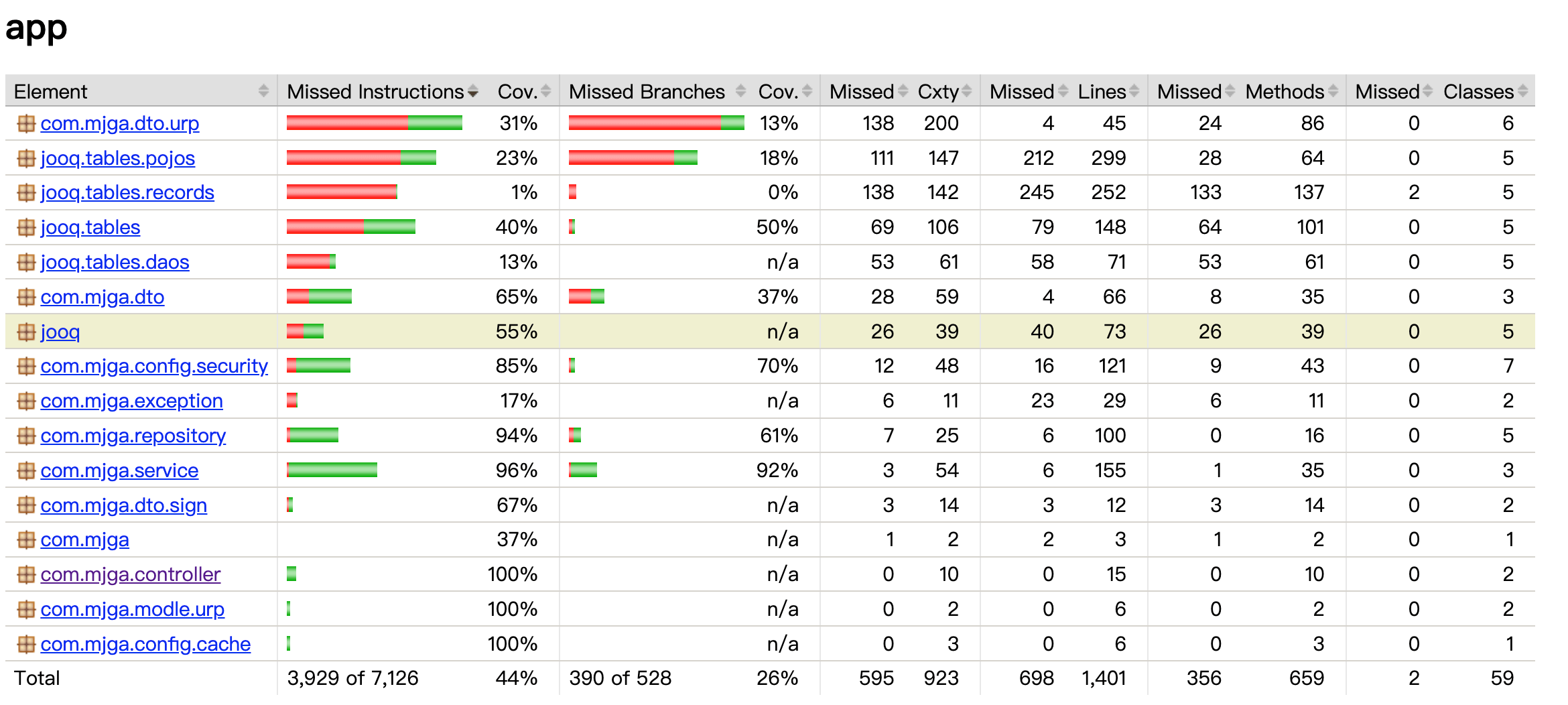
- This repository is primarily for code display and issue collection. The code may lag behind the version available for download from the product's official website.
- Please submit any feedback, discussions, or bugs to the issue tracker, and I will handle them seriously.
- I also welcome any ideas from other communities and will actively participate in the replies.
- More new video tutorials are being recorded, please stay tuned.
- Promote Mjga to your colleagues and friends, and let Java be great again.


