Releases: SimpleHonors/SparkyBot
Release list
SparkyBot 2.0.2

SparkyBot v2.0.2 — Safer Discord Setup
This patch release prevents malformed Discord webhook settings from waiting
until fight processing to fail.
Discord settings now help
- Paste a complete Discord webhook URL as usual.
- Paste
ID/tokenand SparkyBot expands it into the complete URL. - Paste only a token and SparkyBot explains that the webhook ID is missing and
points to Server Settings > Integrations > Webhooks > Copy Webhook URL. - SparkyBot blocks incomplete values before writing the configuration.
Windows configuration recovery
SparkyBot now accepts both ordinary UTF-8 configuration files and Windows
UTF-8 files containing a byte-order mark. Saved settings use BOM-free UTF-8.
Explicit quit behavior
When a run is open, quitting now makes the Discord choice explicit:
- End run without posting & quit never posts, even when auto-post is saved.
- End run, post to Discord & quit posts the report before closing.
Full changes: CHANGELOG.md
SparkyBot 2.0.1
Small maintenance update.
- Fixes the combiner infinity result.
- Fixes the Windows frozen-app update handoff.
Existing installations: run the setup executable for this update.
v2.0.0 — It Has a Front Door Now
Version 2.0 gives SparkyBot a Home screen, a clean dark interface, and a
guided run-to-report workflow.
Start Run. End Run. Report done.
Press Start Run when your squad starts. Press End Run when the
questionable decisions are over. SparkyBot remembers the run if it restarts,
counts fights detected or manually processed while it is open, builds the
Raid Report, and can post it to Discord.
You raid. It handles the paperwork.
Raid Reports without the ritual
Pick the last 12 hours, today, or only the fights you want. SparkyBot reuses
work it already did while watching the raid, so reports build faster instead
of grinding through everything twice. The finished report is one shareable
HTML file with the dashboards, breakdowns, and receipts your squad deserves.
Big reports also shrink themselves before posting. Discord may still judge
your file size, but it has fewer grounds for appeal.
Discord destinations can now have short names such as Main WvW or
Raid Reports. Keep one webhook and everything continues going to the same
place, or choose separate destinations for individual fight posts and the
finished Raid Report. Raid Report captions use the local report-generation
date instead of an ambiguous time range.
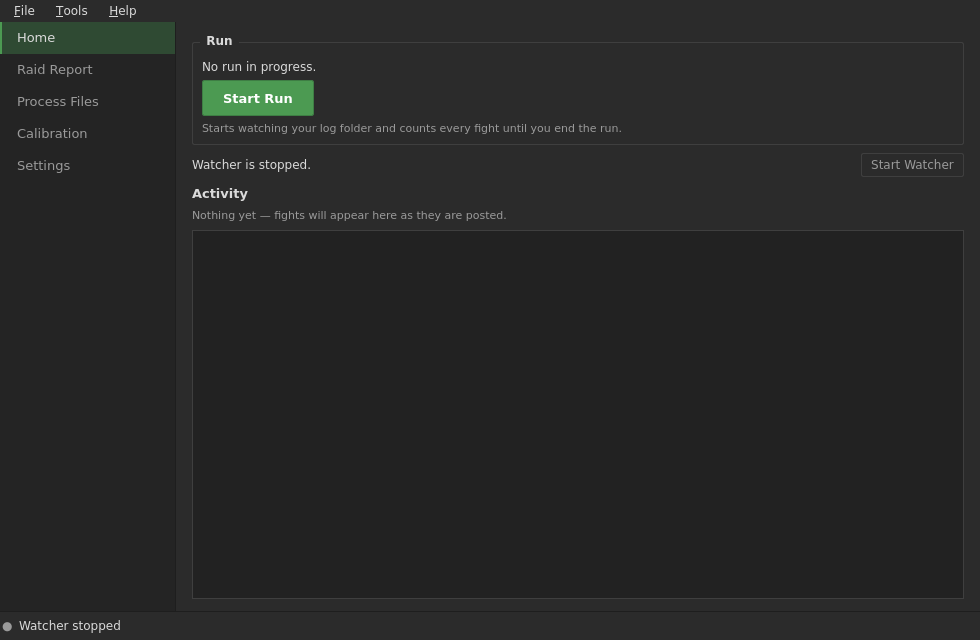
A real Home screen
The activity feed shows detected and processing fights, posted and skipped
results, commentary, voice, and reports in one place. Drop .evtc or
.zevtc files straight onto the window for manual processing.
AI is optional
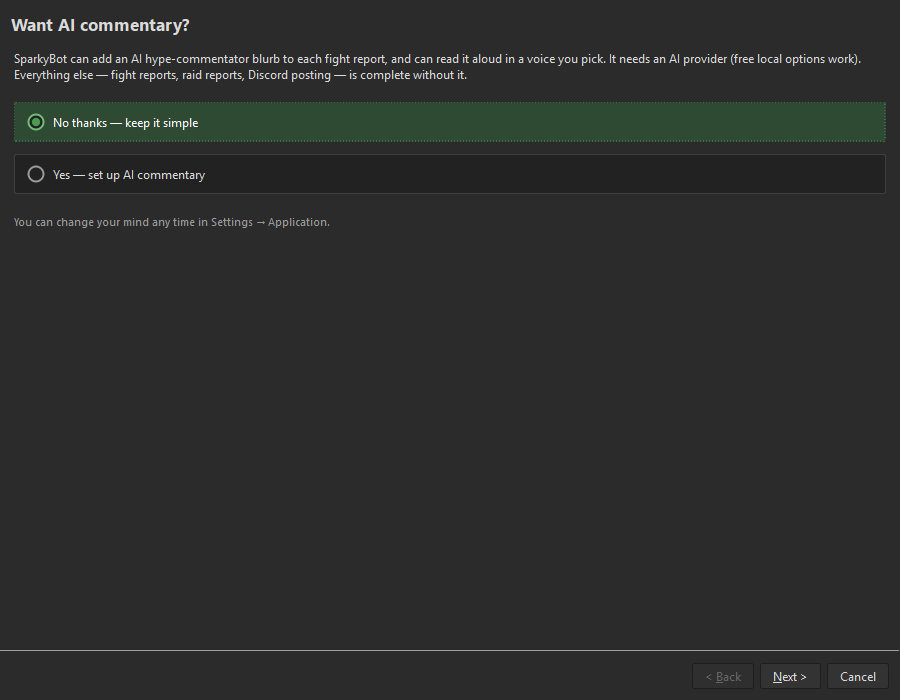
The setup wizard asks before configuring AI. Say no and the AI Commentary,
Voice, Vocabulary, and Calibration screens disappear completely. SparkyBot
still handles fight reports and Raid Reports just fine. Change your mind
later if you want the robot sports commentator back.
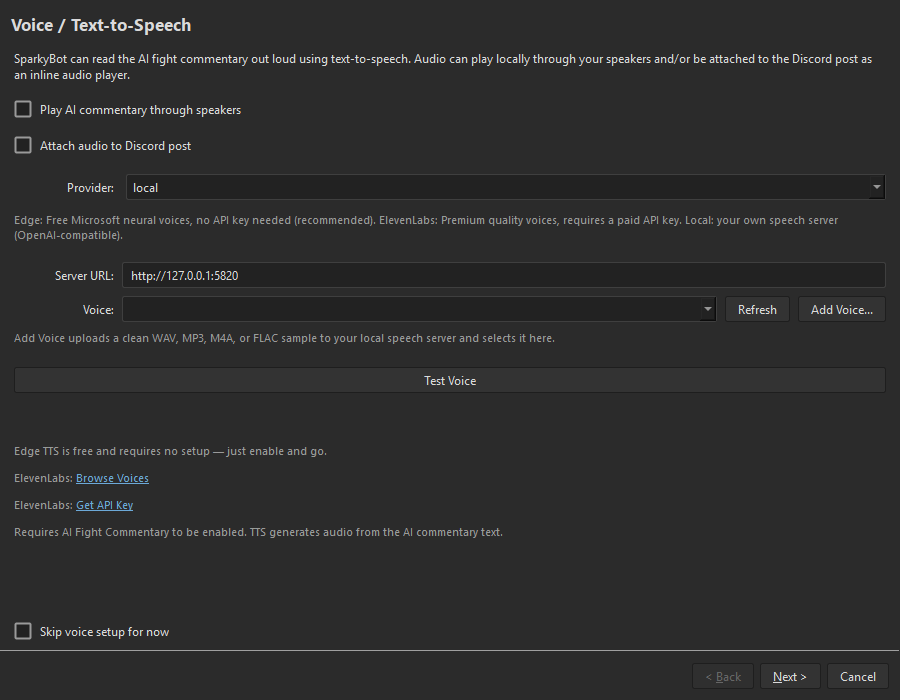
The setup wizard presents clear choices for AI commentary, voice, and report
workflow. Local TTS users can add a voice directly from the voice setup page.
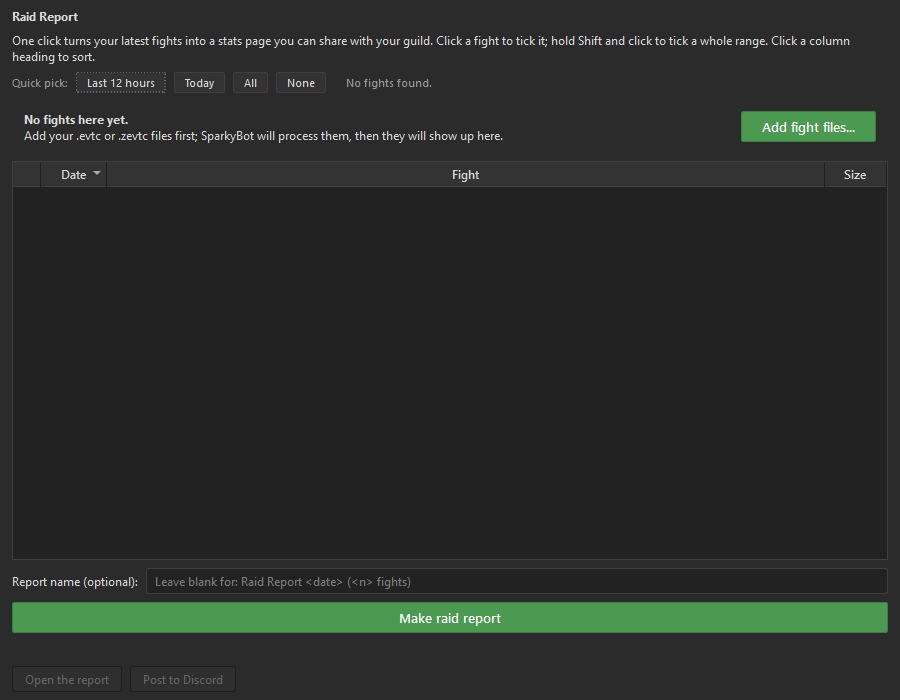
Empty Raid Report and Calibration pages explain what they need and provide a
direct action to continue.
Native Windows installer
Download the installer, double-click it, and launch SparkyBot. No Python
installation. No command line. No pretending pip is a normal thing to ask
of someone who just wants fight reports.
Also better under the hood
- Faster cached Raid Reports with honest progress and useful error details.
- Smaller self-extracting reports that usually post to Discord as plain HTML.
- Persistent records and a Poison Coverage page for the dedicated cloud
enjoyers. - Safer report names and more reliable report packaging.
- Temporary reports clean themselves up instead of quietly founding a
storage empire. - Background parsing stays out of the way while SparkyBot is running.
- Faster, bounded AI connection checks, including direct DeepSeek support.
- Discord webhook destinations have optional names and separate routing for
fight posts versus Raid Reports.
Full details: CHANGELOG.md
v1.8.5 — Speaks in Your Voice
SparkyBot can now speak in a voice you choose — including a cloned one — and every stat it reads comes out sounding natural.
New: local voice cloning
A third TTS provider, local, points SparkyBot at any self-hosted OpenAI-compatible speech server (e.g. Chatterbox). It's free, private, and needs no API key.
- Bring your own voice. In Settings → TTS, pick a voice from the server or hit Upload Sample with a short clean recording — the server clones it at generation time. Only upload voices you own or have permission to use.
- Works for both the Discord audio attachment and local playback, same as the existing providers.
edgeandelevenlabsare untouched and still available.
New: speech-first stats
Sparky now writes numbers the way a voice actually says them, so commentary sounds right on any TTS engine and any model:
- Big numbers spell their unit — "over a million healing", not "1M".
- Durations read out — "three minutes forty-four seconds", not "3m44s".
- Matchups read out — "fifty-five versus fifty-four", not "55v54".
Validated to produce clean output across DeepSeek, Llama 3.3, Gemini, and MiniMax.
Fixes
- Voice-sample upload now cleans filenames automatically and shows the real server error instead of a bare status code.
Set ttsProvider = local and point ttsLocalUrl at your speech server to try it. Restart to pick up the new default prompt.
v1.8.4 — Reasoning-mode auto-detection
SparkyBot v1.8.4 — Reasoning-mode auto-detection
Some AI models run in a hidden "thinking / reasoning" mode that can spend the
entire response budget thinking and return empty commentary. Until now
SparkyBot tried to recognize those models by name/host — which never worked for
models routed through proxies like OpenRouter (they hide behind one address).
v1.8.4 detects it empirically instead of guessing.
What's new
- Test Connection now probes the live model. A healthy model is verified in
a single call and you see nothing new. A reasoning-troubled model is tested
against the handful of known "turn thinking down" conventions
(reasoning_effort, OpenRouter'sreasoningflag,enable_thinking,
think_enable, GeminithinkingBudget, Anthropicthinking) until one
actually returns text. - The working setting is saved and reused for every real fight — no more
per-model guesswork. When there's a single correct answer it applies itself
and tells you; when both "reasoning off (cheaper)" and "reasoning on (maybe
smarter)" work, it asks you to choose. - Same behavior in the Setup Wizard and the Settings dialog.
Fixes
- Killed the empty-response retry loop: a reasoning model that ran out of room
is now given more budget on retry (with the off-switch engaged), never
less — ending the450 → 400 → 400 → emptyspiral.
Notes
- Fully backward compatible: existing configs behave exactly as before until you
run Test Connection.
v1.8.3 — Gemini Pro, Fixed for Real
🐛 v1.8.3 — "Gemini Pro, Fixed for Real"
Fixed
Gemini 2.5 Pro errored out or produced no commentary.
Turns out Gemini's "Pro" models are special: they can't turn off their internal reasoning at all — unlike every other model Sparky supports. If your "Disable Thinking" setting was on, Gemini Pro rejected the request outright (Budget 0 is invalid). With that avoided, a second problem showed up: Gemini Pro's reasoning could quietly eat the entire response budget thinking, leaving nothing for the actual commentary — no error, just silence.
Both are fixed: Sparky now recognizes Gemini Pro models and gives them room to think and write, automatically. No settings to change.
v1.8.2 — Names, Not Nicknames
🐛 v1.8.2 — "Names, Not Nicknames"
Fixed
Sparky was renaming your best players to class nicknames instead of using their names.
When a player had been highlighted enough recently to hit the callout cooldown, Sparky was supposed to just leave them out of that fight's spotlight for a bit. Instead it was giving them a made-up title based on their class ("the burst evoker," "the dps evoker") and still calling them out with it — so a strong player could get stuck with the same generic nickname fight after fight instead of their real name ever coming back.
Fixed: a benched player is now skipped entirely for that fight's highlight — no name, no nickname. If another player is eligible, they get named normally instead.
No settings to change — this is automatic.
v1.8.1 — Catches Every Log, Talks to Every Model
🩹 v1.8.1 — "Catches Every Log, Talks to Every Model"
A focused bug-fix release. Two field-reported problems, both fixed, both verified against real components before shipping.
Added
Reasoning models (GPT-5.x, o-series) now produce commentary.
These models spend their whole token budget "thinking" before writing anything, so Sparky's default budget got used up and nothing came out. Sparky now recognizes a reasoning model, asks it to think briefly, and gives it enough room to reason and write the roast — automatically, no settings to change.
Anthropic (Claude), DeepSeek, and Xiaomi MiMo added to the provider list.
Pick any of them in Settings and paste that provider's API key — Claude, DeepSeek, or MiMo now work as the commentary engine. The provider dropdown is now alphabetized too.
Model list refresh in first-run setup.
The setup wizard now has a ↻ Refresh button next to the model picker, so a fresh install can pull the live list of models from your provider instead of only the built-in ones.
OpenAI's "-pro" reasoning models (gpt-5.5-pro, o1-pro, o3-pro) now work.
These models don't answer on the normal chat door every other model uses — they need a different endpoint. Sparky now recognizes that and switches over automatically the first time it happens; no setting to change.
Default response length raised (350 → 450).
350 tokens was clipping commentary short on some GPT and Claude models. Existing installs keep whatever you already set — this only changes the out-of-the-box default for new setups.
Fixed
"Test Connection" used a fixed 15-second timeout, ignoring your setting.
The Test Connection button in Settings and in first-run setup always waited exactly 15 seconds, no matter what you set the "API Timeout" option to. Slow models (like OpenAI's "-pro" tier) can legitimately take longer than that to answer, so the test looked broken even when a real fight would have worked fine. It now respects your configured timeout.
Fresh installs crashed on launch.
A brand-new download crashed immediately in the first-run setup wizard with ImportError: cannot import name 'PRESETS'. A provider-preset list had been moved during an internal code reorganization, and the compatibility layer that keeps older import paths working wasn't updated to forward it. Fixed — clean installs launch straight into setup again. (Existing installs with a saved config skip the wizard and were never affected.)
Local log detection missed fights on some setups.
ArcDPS often writes a combat log under a temporary/extensionless name and then renames it to the final .evtc/.zevtc. SparkyBot's local (OS-native) watcher was only listening for "a new file appeared" — and at that instant the file has no .evtc/.zevtc name yet, so nothing got picked up. The moment the real extension shows up is the rename, which we now listen for. If you were watching a local ArcDPS folder and Sparky went quiet after fights, this is your fix. (Users pointing Sparky at a network share were never affected — that path scans the folder and always saw the final name.)
DeepSeek produced no commentary — same root cause as the reasoning-model fix above, silent this time.
DeepSeek's models also reason before writing, but they don't error about it — they just quietly use up the whole response budget thinking and hand back nothing. Sparky now gives DeepSeek the same headroom treatment automatically, before it ever fails.
Newer OpenAI / Azure OpenAI models returned an error and produced no commentary.
Recent models (GPT-5.x, o-series) changed the rules on two request settings: they require max_completion_tokens instead of max_tokens, and they only allow the default temperature. Sparky was still sending the old settings, so those models rejected every request. Sparky now adapts automatically — it learns from the API's error, switches to the setting the model wants, retries, and remembers the choice for the rest of the session. This works for OpenAI and Azure OpenAI (where the deployment name gives no hint about the underlying model), without breaking older models, local servers, or other OpenAI-compatible providers, which keep using the settings they understand.
Notes
- No settings changes required — both fixes are automatic.
- The README is unchanged; feature docs still describe v1.8.0.
- Thanks to @jackpoz for the detailed reports (extensionless watcher event + the Azure
max_completion_tokenserror) and to Drevarr for pinpointing theon_movedfix for the file watcher.
Contributors

Assets 2
v1.8.0 — Grades on YOUR Curve
Sparky stops grading you against strangers.
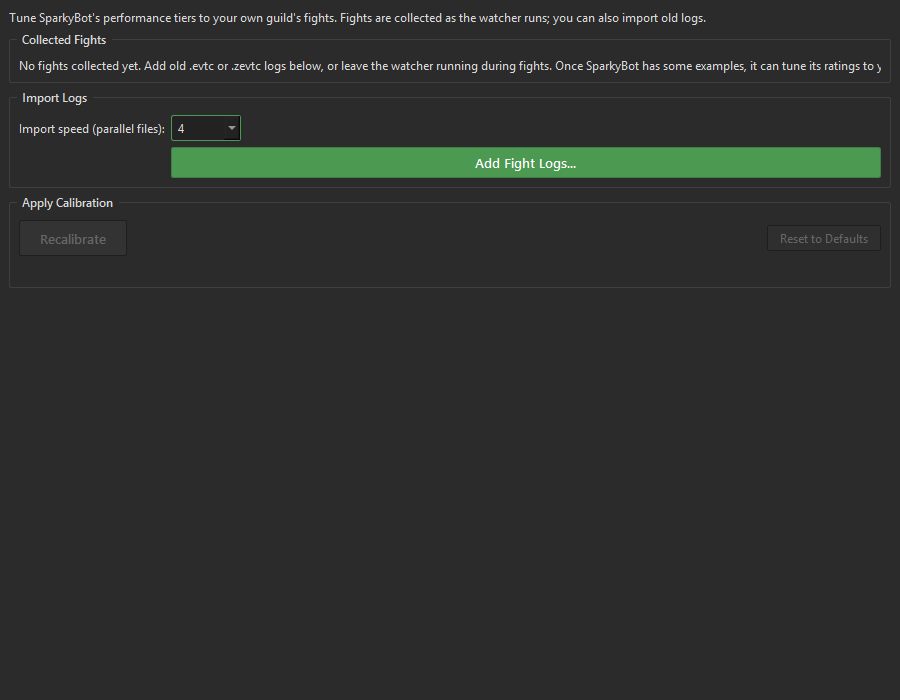
Its performance tiers (solid → strong → dominant → exceptional → legendary) used to come from a stock corpus of ~800 fights. Now you can retune the whole curve to your own guild, from the Settings window — no spreadsheet, no code.
The new Calibration tab
- Bulk-import your logs — point it at a pile of
.evtcfiles and chew through up to 32 at once in parallel. A backlog that took days takes minutes. - Auto-collects as you play — every fight the watcher analyzes quietly joins your calibration corpus. No homework.
- Preview before you commit — recalibration pops a window showing exactly how every tier moves: old → new, ↑/↓, percent, color-coded. Confirm or back out.
- Honest to a fault — the numbers come straight from your own fights. Run a sweat-lord guild and "dominant" healing jumps to match; run a feeder comp and the bar drops. A loud warning fires if you try to calibrate off too few fights.
- Auto-prompts when an import finishes, because remembering to click a button is beneath you.
- Applies live (no restart), and Reset to Defaults is one click away.
Plus everything from 1.7.5 (long-horizon anti-repetition + data-layer player cooldown) and 1.7.0 (the Anti-Slop Update).
Auto-updates from any 1.7.x install.
v1.7.5 — It Remembers Its Own Tics
Sparky's anti-repetition got a long memory, and its player-cooldown stopped being gameable.
What changed
- Long-horizon signature phrases. The repeat-killer used to only remember the last ~10 fights, so pet phrases ("poor stomp discipline," "from the dirt") aged out and crept back in. Sparky now keeps a running ledger of its own crutch phrases across its whole history and keeps them benched — with a wider DO-NOT-REUSE list so the long tail can't slip through. It decays phrases it's stopped using, so the list never ossifies.
- Data-layer player cooldown. Telling the model "don't keep naming the same player" had a loophole — it dropped the name but credited them by build instead ("the power amalgam… again"). Now a cooled-down player's individual stats are redacted from what the model sees, so it can't credit a stat line that isn't there. Their numbers still count toward the squad totals, so the fight's scale stays honest.
- Self-updater hardened for network shares. Updates now apply by renaming locked files aside instead of fighting the lock — no more stuck-update loops on SMB installs.
Plus a new README section explaining how Sparky grades players on a percentile curve against a corpus of 800+ real fights.
Auto-updates from any 1.7.x install.