









Speasy is a free and open-source Python package that makes it easy to find and load space physics data from a variety of data sources, whether it is online and public such as CDAWEB and AMDA, or any described archive, local or remote. Finding and loading data is where any science project starts. It would seem easy a priori but, considering the diverse array of missions and instruments available nowadays, it proves to be one of the major bottlenecks, especially for students and newcomers. Speasy solves this problem by providing a single, easy-to-use interface to over 70 space missions and 65,000 products.
Don't want to write code? See our graphical interface SciQLop.
- Simple and intuitive API (
spz.get_data(...)to get them all) - Speasy variables are like Pandas DataFrames with seamless conversion to/from them (as long as the shape is compatible)
- Speasy variables support numpy operations, see numpy operations example below
- Speasy variables filtering and resampling capabilities, see resampling example below
- Local cache to avoid redundant downloads
- Uses the SciQLOP ultra fast community cache server
- Full support of AMDA API
- Can retrieve time-series from AMDA, CDAWeb, CSA, SSCWeb
- Support data access from any local or remote archives described by YAML file.
- Also available as Speasy.jl for Julia users
We want Speasy to be the best possible tool for space physics research. You can help us by:
- Answering our user survey here.
- Reporting bugs or requesting features here.
- Creating or participating in discussions here.
Your feedback is essential to making Speasy a better tool for everyone.
Installing Speasy with pip (more details here):
$ python -m pip install speasy
# or
$ python -m pip install --user speasyThis simple code example shows how easy it is to get data using Speasy. The code imports the Speasy package and defines a variable named ace_mag. This variable stores the data for the ACE IMF product, for the time period from June 2, 2016 to June 5, 2016. The code then uses the Speasy plot() function to plot the data.
import speasy as spz
ace_mag = spz.get_data('amda/imf', "2016-6-2", "2016-6-5")
ace_mag.plot();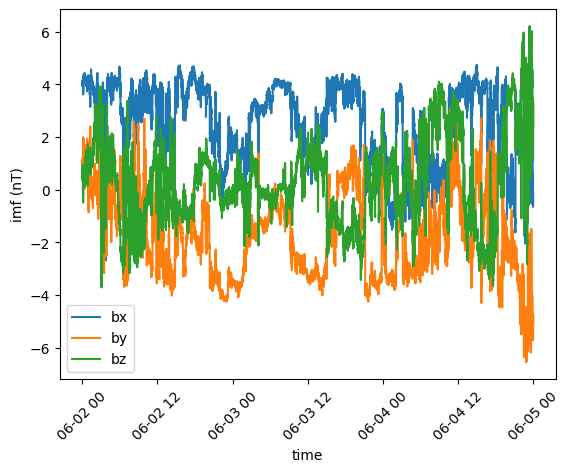
Where amda is the data provider and imf is the product ID.
Using the dynamic inventory produces the same result as the previous example, but lets you discover available data through tab-completion in IPython, Jupyter notebooks, or any Python environment that supports it.
import speasy as spz
amda_tree = spz.inventories.data_tree.amda
ace_mag = spz.get_data(amda_tree.Parameters.ACE.MFI.ace_imf_all.imf, "2016-6-2", "2016-6-5")
ace_mag.plot();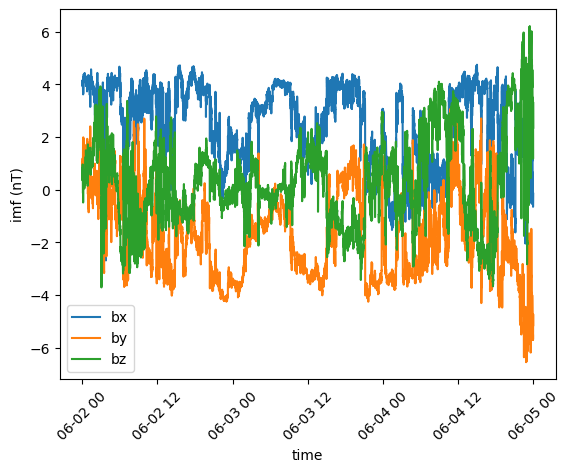
This code example shows how to use Speasy to plot multiple time series of space physics data from the MMS1 spacecraft on a single figure, with a shared x-axis. The code imports the Speasy package and the Matplotlib plotting library. It then creates a figure with six subplots, arranged in a single column. Next, it defines a list of products and axes to plot. Finally, it iterates over the list of products and axes, plotting each product on the corresponding axis. The code uses the Speasy get_data() function to load the data for each product, and the replace_fillval_by_nan() function to replace any fill values with NaNs.
import speasy as spz
import matplotlib.pyplot as plt

fig = plt.figure(figsize=(8, 16), layout="constrained")
gs = fig.add_gridspec(6, hspace=0, wspace=0)
axes = gs.subplots(sharex=True)

plots = [
    (spz.inventories.tree.cda.MMS.MMS1.FGM.MMS1_FGM_SRVY_L2.mms1_fgm_b_gse_srvy_l2_clean, axes[0]),
    (spz.inventories.tree.cda.MMS.MMS1.SCM.MMS1_SCM_SRVY_L2_SCSRVY.mms1_scm_acb_gse_scsrvy_srvy_l2 , axes[1]),
    (spz.inventories.tree.cda.MMS.MMS1.DES.MMS1_FPI_FAST_L2_DES_MOMS.mms1_des_bulkv_gse_fast, axes[2]),
    (spz.inventories.tree.cda.MMS.MMS1.DES.MMS1_FPI_FAST_L2_DES_MOMS.mms1_des_temppara_fast, axes[3]),
    (spz.inventories.tree.cda.MMS.MMS1.DES.MMS1_FPI_FAST_L2_DES_MOMS.mms1_des_tempperp_fast, axes[3]),
    (spz.inventories.tree.cda.MMS.MMS1.DES.MMS1_FPI_FAST_L2_DES_MOMS.mms1_des_energyspectr_omni_fast, axes[4]),
    (spz.inventories.tree.cda.MMS.MMS1.DIS.MMS1_FPI_FAST_L2_DIS_MOMS.mms1_dis_energyspectr_omni_fast, axes[5])
]

def plot_product(product, ax):
    values = spz.get_data(product, "2019-01-02T15", "2019-01-02T22")
    values.replace_fillval_by_nan().plot(ax=ax)

for p in plots:
    plot_product(p[0], p[1])

plt.show()
Can't get MMS1_FGM_SRVY_L2/mms1_fgm_b_gse_srvy_l2_clean without web service, switching to web service
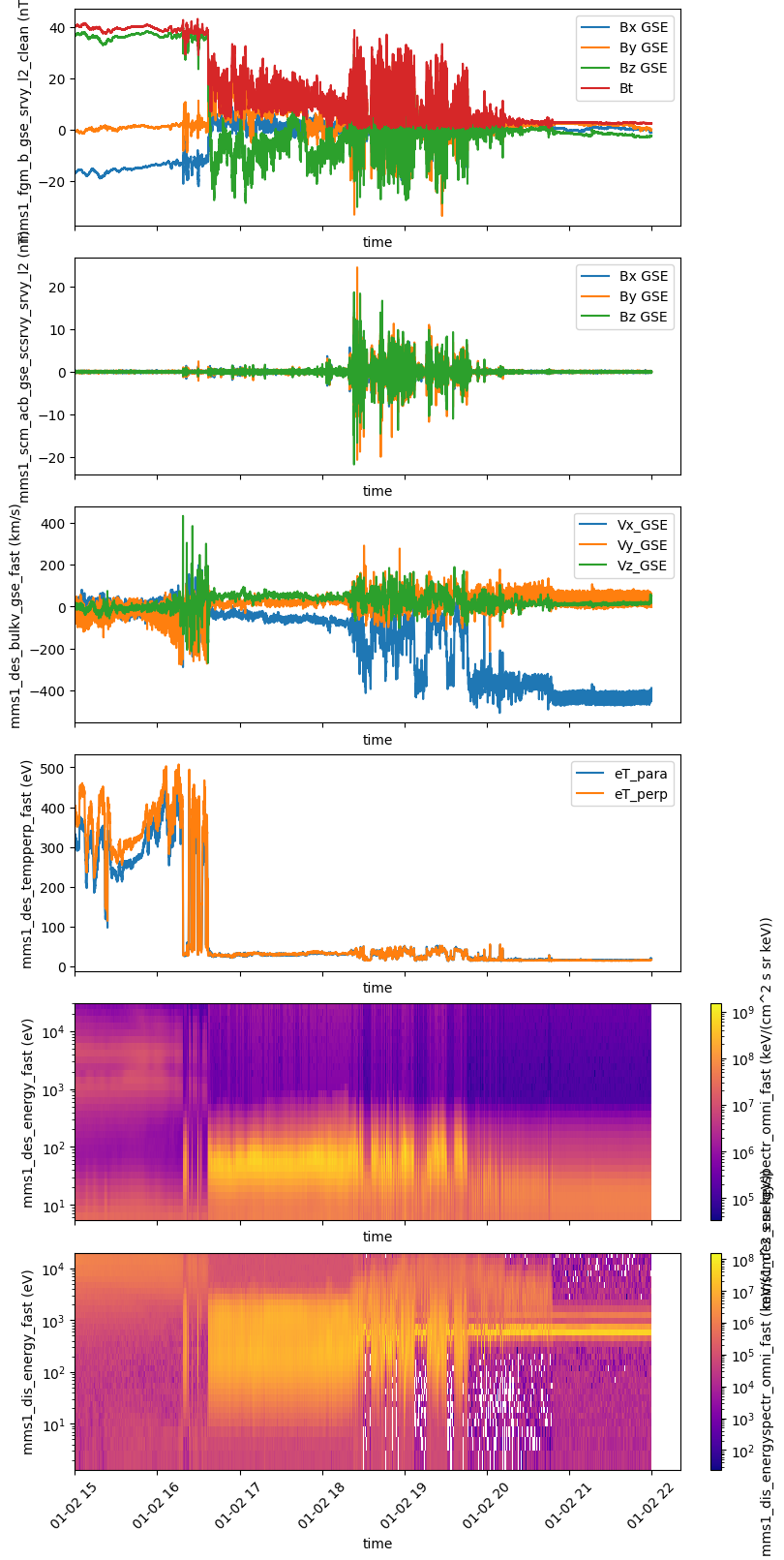
More complex requests like this one are supported:
import speasy as spz
products = [
    spz.inventories.tree.amda.Parameters.Wind.SWE.wnd_swe_kp.wnd_swe_vth,
    spz.inventories.tree.amda.Parameters.Wind.SWE.wnd_swe_kp.wnd_swe_pdyn,
    spz.inventories.tree.amda.Parameters.Wind.SWE.wnd_swe_kp.wnd_swe_n,
    spz.inventories.tree.cda.Wind.WIND.MFI.WI_H2_MFI.BGSE,
    spz.inventories.tree.ssc.Trajectories.wind,
]
intervals = [["2010-01-02", "2010-01-02T10"], ["2009-08-02", "2009-08-02T10"]]
data = spz.get_data(products, intervals)
data
[[SpeasyVariable(
Name: 'wnd_swe_vth',
Time Range: 2010-01-02T00:00:34.450000000 - 2010-01-02T09:59:39.371000000
Shape: (368, 1),
Unit: 'km/s',
Columns: ['v_thermal'],
Meta: {
CATDESC: 'wnd_swe_vth',
FIELDNAM: 'v_thermal',
FORMAT: 'F11.4',
VAR_TYPE: 'data',
FILLVAL: [nan],
SI_CONVERSION: '\x00',
VALIDMIN: [-3.4028234663852886e+38],
VALIDMAX: [3.4028234663852886e+38],
DATA: 'N/A',
DISPLAY_TYPE: 'time_series',
LABLAXIS: 'v_thermal',
TENSOR_FRAME: '\x00',
TENSOR_ORDER: '0',
UNITS: 'km/s',
VAR_NOTES: '\x00',
DEPEND_0: 'AMDA_TIME',
},
Size: '5.2 kB',
),
SpeasyVariable(
Name: 'wnd_swe_vth',
Time Range: 2009-08-02T00:02:32.599000000 - 2009-08-02T09:59:25.303000000
Shape: (366, 1),
Unit: 'km/s',
Columns: ['v_thermal'],
Meta: {
CATDESC: 'wnd_swe_vth',
FIELDNAM: 'v_thermal',
FORMAT: 'F11.4',
VAR_TYPE: 'data',
FILLVAL: [nan],
SI_CONVERSION: '\x00',
VALIDMIN: [-3.4028234663852886e+38],
VALIDMAX: [3.4028234663852886e+38],
DATA: 'N/A',
DISPLAY_TYPE: 'time_series',
LABLAXIS: 'v_thermal',
TENSOR_FRAME: '\x00',
TENSOR_ORDER: '0',
UNITS: 'km/s',
VAR_NOTES: '\x00',
DEPEND_0: 'AMDA_TIME',
},
Size: '5.2 kB',
)],
[SpeasyVariable(
Name: 'wnd_swe_pdyn',
Time Range: 2010-01-02T00:00:34.450000000 - 2010-01-02T09:59:39.371000000
Shape: (368, 1),
Unit: 'nPa',
Columns: ['ram pressure'],
Meta: {
CATDESC: 'wnd_swe_pdyn',
FIELDNAM: 'ram pressure',
FORMAT: 'F14.3',
VAR_TYPE: 'data',
FILLVAL: [nan],
SI_CONVERSION: '\x00',
VALIDMIN: [-1.7976931348623157e+308],
VALIDMAX: [1.7976931348623157e+308],
DATA: 'N/A',
DISPLAY_TYPE: 'time_series',
LABLAXIS: 'ram pressure',
TENSOR_FRAME: '\x00',
TENSOR_ORDER: '0',
UNITS: 'nPa',
VAR_NOTES: "Derived parameter from expression '0.000002*$wnd_swe_n*pow($wnd_swe_vmag,2)'",
DEPEND_0: 'AMDA_TIME',
},
Size: '6.7 kB',
),
SpeasyVariable(
Name: 'wnd_swe_pdyn',
Time Range: 2009-08-02T00:02:32.599000000 - 2009-08-02T09:59:25.303000000
Shape: (366, 1),
Unit: 'nPa',
Columns: ['ram pressure'],
Meta: {
CATDESC: 'wnd_swe_pdyn',
FIELDNAM: 'ram pressure',
FORMAT: 'F14.3',
VAR_TYPE: 'data',
FILLVAL: [nan],
SI_CONVERSION: '\x00',
VALIDMIN: [-1.7976931348623157e+308],
VALIDMAX: [1.7976931348623157e+308],
DATA: 'N/A',
DISPLAY_TYPE: 'time_series',
LABLAXIS: 'ram pressure',
TENSOR_FRAME: '\x00',
TENSOR_ORDER: '0',
UNITS: 'nPa',
VAR_NOTES: "Derived parameter from expression '0.000002*$wnd_swe_n*pow($wnd_swe_vmag,2)'",
DEPEND_0: 'AMDA_TIME',
},
Size: '6.7 kB',
)],
[SpeasyVariable(
Name: 'wnd_swe_n',
Time Range: 2010-01-02T00:00:34.450000000 - 2010-01-02T09:59:39.371000000
Shape: (368, 1),
Unit: 'cm-3',
Columns: ['density'],
Meta: {
CATDESC: 'wnd_swe_n',
FIELDNAM: 'density',
FORMAT: 'F11.4',
VAR_TYPE: 'data',
FILLVAL: [nan],
SI_CONVERSION: '\x00',
VALIDMIN: [-3.4028234663852886e+38],
VALIDMAX: [3.4028234663852886e+38],
DATA: 'N/A',
DISPLAY_TYPE: 'time_series',
LABLAXIS: 'density',
TENSOR_FRAME: '\x00',
TENSOR_ORDER: '0',
UNITS: 'cm-3',
VAR_NOTES: '\x00',
DEPEND_0: 'AMDA_TIME',
},
Size: '5.2 kB',
),
SpeasyVariable(
Name: 'wnd_swe_n',
Time Range: 2009-08-02T00:02:32.599000000 - 2009-08-02T09:59:25.303000000
Shape: (366, 1),
Unit: 'cm-3',
Columns: ['density'],
Meta: {
CATDESC: 'wnd_swe_n',
FIELDNAM: 'density',
FORMAT: 'F11.4',
VAR_TYPE: 'data',
FILLVAL: [nan],
SI_CONVERSION: '\x00',
VALIDMIN: [-3.4028234663852886e+38],
VALIDMAX: [3.4028234663852886e+38],
DATA: 'N/A',
DISPLAY_TYPE: 'time_series',
LABLAXIS: 'density',
TENSOR_FRAME: '\x00',
TENSOR_ORDER: '0',
UNITS: 'cm-3',
VAR_NOTES: '\x00',
DEPEND_0: 'AMDA_TIME',
},
Size: '5.2 kB',
)],
[SpeasyVariable(
Name: 'BGSE',
Time Range: 2010-01-02T00:00:00.078500000 - 2010-01-02T09:59:59.950500000
Shape: (389013, 3),
Unit: 'nT',
Columns: ['Bx (GSE)', 'By (GSE)', 'Bz (GSE)'],
Meta: {
FIELDNAM: 'Magnetic field vector in GSE cartesian coordinates',
VALIDMIN: [-65534.0, -65534.0, -65534.0],
VALIDMAX: [65534.0, 65534.0, 65534.0],
SCALEMIN: [-5.998990058898926,
-3.514899969100952,
-4.955120086669922],
SCALEMAX: [4.561240196228027, 5.447979927062988, 3.987950086593628],
UNITS: 'nT',
FORMAT: 'E13.6',
MONOTON: 'FALSE',
SCALETYP: 'LINEAR',
CATDESC: 'Magnetic field vector in GSE cartesian coordinates',
FILLVAL: [-9.999999848243207e+30],
LABL_PTR_1: ['Bx (GSE)', 'By (GSE)', 'Bz (GSE)'],
DEPEND_0: 'Epoch',
VAR_TYPE: 'data',
TIME_RES: 'Variable',
},
Size: '7.8 MB',
),
SpeasyVariable(
Name: 'BGSE',
Time Range: 2009-08-02T00:00:00.017500000 - 2009-08-02T09:59:59.982500000
Shape: (389069, 3),
Unit: 'nT',
Columns: ['Bx (GSE)', 'By (GSE)', 'Bz (GSE)'],
Meta: {
FIELDNAM: 'Magnetic field vector in GSE cartesian coordinates',
VALIDMIN: [-65534.0, -65534.0, -65534.0],
VALIDMAX: [65534.0, 65534.0, 65534.0],
SCALEMIN: [-5.998990058898926,
-3.514899969100952,
-4.955120086669922],
SCALEMAX: [4.561240196228027, 5.447979927062988, 3.987950086593628],
UNITS: 'nT',
FORMAT: 'E13.6',
MONOTON: 'FALSE',
SCALETYP: 'LINEAR',
CATDESC: 'Magnetic field vector in GSE cartesian coordinates',
FILLVAL: [-9.999999848243207e+30],
LABL_PTR_1: ['Bx (GSE)', 'By (GSE)', 'Bz (GSE)'],
DEPEND_0: 'Epoch',
VAR_TYPE: 'data',
TIME_RES: 'Variable',
},
Size: '7.8 MB',
)],
[SpeasyVariable(
Name: '',
Time Range: 2010-01-02T00:00:00.000000000 - 2010-01-02T09:48:00.000000000
Shape: (50, 3),
Unit: 'km',
Columns: ['X', 'Y', 'Z'],
Meta: { CoordinateSystem: 'GSE', UNITS: 'km', },
Size: '1.9 kB',
),
SpeasyVariable(
Name: '',
Time Range: 2009-08-02T00:00:00.000000000 - 2009-08-02T09:48:00.000000000
Shape: (50, 3),
Unit: 'km',
Columns: ['X', 'Y', 'Z'],
Meta: { CoordinateSystem: 'GSE', UNITS: 'km', },
Size: '1.9 kB',
)]]
Speasy variables support numpy operations, as shown in this example. The code imports the Speasy package and the NumPy library, and uses the Speasy get_data() function to load the magnetic field data for the MMS1 spacecraft for the time period from January 1, 2017 to January 1, 2017. The code then uses the NumPy sqrt() and sum() functions to compute the norm of the magnetic field vector. Finally, the code uses the NumPy allclose() function to check if the computed norm is close to the provided total magnetic field norm (Bt) values.
import speasy as spz
import numpy as np
mms1_products = spz.inventories.tree.cda.MMS.MMS1
b = spz.get_data(mms1_products.FGM.MMS1_FGM_SRVY_L2.mms1_fgm_b_gsm_srvy_l2, '2017-01-01T02:00:00', '2017-01-01T02:00:15')
b.replace_fillval_by_nan(inplace=True)  # replace fill values by NaN
bt = b["Bt"]
b = b["Bx GSM", "By GSM", "Bz GSM"]
computed_norm = np.sqrt(np.sum(b ** 2, axis=1))
print(f"Type of b: {type(b)}\nType of computed_norm: {type(computed_norm)}\nType of bt: {type(bt)}")
print(f"Is the computed norm close to the provided total magnetic field norm? {np.allclose(computed_norm, bt)}")
Type of b: <class 'speasy.products.variable.SpeasyVariable'>
Type of computed_norm: <class 'speasy.products.variable.SpeasyVariable'>
Type of bt: <class 'speasy.products.variable.SpeasyVariable'>
Is the computed norm close to the provided total magnetic field norm? True
Speasy provides a simple way to filter and resample data. In this example, the code imports the Speasy package and the Matplotlib plotting library. It then uses the Speasy get_data() function to load the magnetic field and temperature data for the MMS1 spacecraft for the time period from January 1, 2017 to January 1, 2017. The code then uses the Speasy interpolate() function to interpolate the temperature data to match the magnetic field data sampling rate. Finally, the code plots the magnetic field and temperature data on the same figure.
import speasy as spz
from speasy.signal.resampling import interpolate
import matplotlib.pyplot as plt
mms1_products = spz.inventories.tree.cda.MMS.MMS1

b, Tperp, Tpara = spz.get_data(
        [
            mms1_products.FGM.MMS1_FGM_SRVY_L2.mms1_fgm_b_gsm_srvy_l2,
            mms1_products.DIS.MMS1_FPI_FAST_L2_DIS_MOMS.mms1_dis_tempperp_fast,
            mms1_products.DIS.MMS1_FPI_FAST_L2_DIS_MOMS.mms1_dis_temppara_fast
        ],
        '2017-01-01T02:00:00',
        '2017-01-01T02:00:15'
    )


Tperp_interp, Tpara_interp = interpolate(b, [Tperp, Tpara])

plt.figure()
ax = b.plot()
plt.plot(Tperp_interp.time, Tperp_interp.values, marker='+')
plt.plot(Tpara_interp.time, Tpara_interp.values, marker='+')
plt.tight_layout()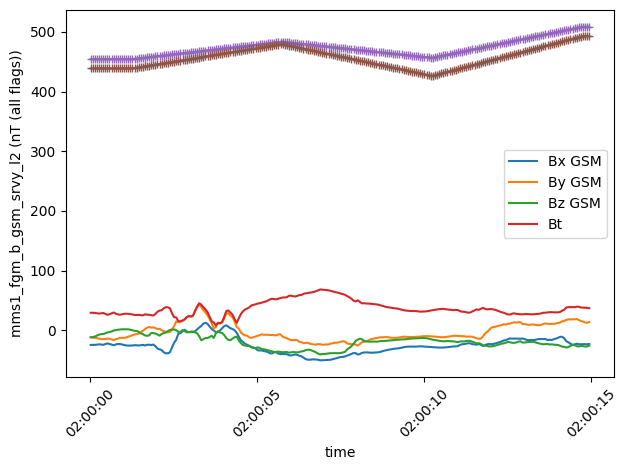
Check out Speasy documentation and examples.
- Speasy is not a plotting package. basic plotting capabilities are here for illustration purposes and making quick-and-dirty plots. It is not meant to produce publication ready figures, prefer using Matplotlib directly for example.
The development of Speasy is supported by the CDPP.
This package was created with Cookiecutter and the audreyr/cookiecutter-pypackage project template.