A type-safe, modular, chainable image processing library built on top of OpenCV.js with a fluent API leveraging pipeline processing.
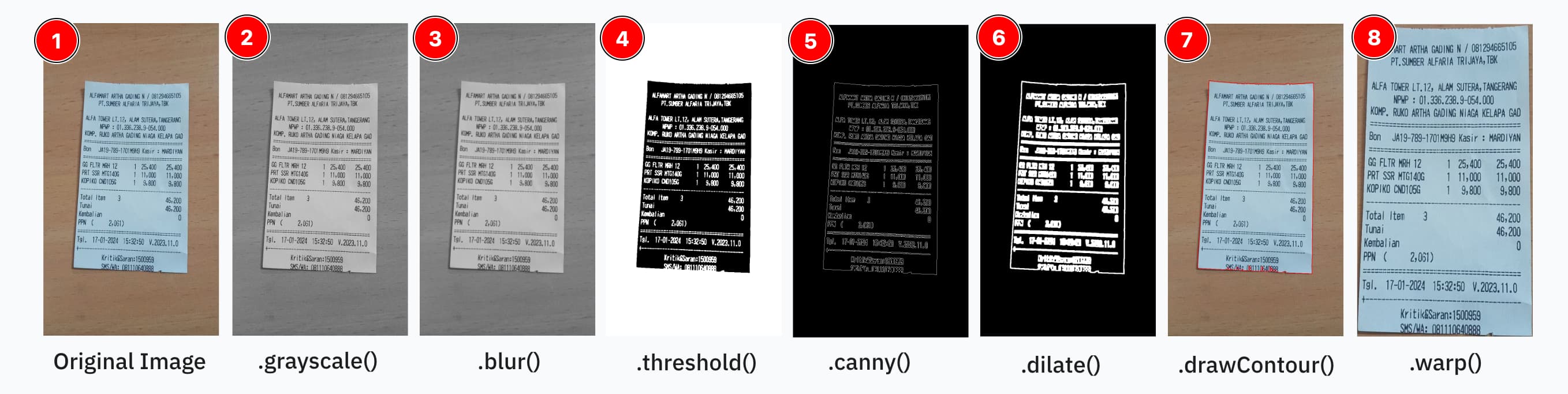
Image manipulation as easy as:
const processor = new ImageProcessor(canvas);

const result = processor
  .grayscale()
  .blur({ size: [5, 5] })
  .threshold()
  .invert()
  .dilate({ size: [20, 20], iter: 5 })
  .toCanvas();

// Memory cleanup
processor.destroy();
This work is based on https://github.com/TechStark/opencv-js.
OpenCV is powerful but can be cumbersome to use directly. This library provides:
- Simplified API: Transform complex OpenCV calls into simple chainable methods
- Reduced Boilerplate: No need to manage memory, conversions, or dimensions manually
- Development Speed: Add image processing to your app in minutes, not hours
- Extensibility: Custom operations for your specific needs without library modifications
- TypeScript Integration: Full IntelliSense support with parameter validation
- Web Support: Supports running directly in the browser
- Loosely Coupled: Canvas utilities are fully decoupled from OpenCV. Usable in Browser Extensions, Service Workers, and other constrained environments where OpenCV cannot be initialised
Install using your preferred package manager:
npm install ppu-ocv
yarn add ppu-ocv
bun add ppu-ocvNote that operation order matters — you should have at least basic familiarity with OpenCV. See the operations table below.
import { CanvasProcessor, ImageProcessor } from "ppu-ocv";

const file = Bun.file("./assets/receipt.jpg");
const image = await file.arrayBuffer();

await ImageProcessor.initRuntime(); // init opencv
const canvas = await CanvasProcessor.prepareCanvas(image);

const processor = new ImageProcessor(canvas);
processor
  .grayscale()
  .blur({ size: [5, 5] })
  .threshold();

const resultCanvas = processor.toCanvas();
processor.destroy();
Or use the execute API directly:
import { CanvasProcessor, CanvasToolkit, ImageProcessor, cv } from "ppu-ocv";

const file = Bun.file("./assets/receipt.jpg");
const image = await file.arrayBuffer();

const canvasToolkit = CanvasToolkit.getInstance();
await ImageProcessor.initRuntime();
const canvas = await CanvasProcessor.prepareCanvas(image);

const processor = new ImageProcessor(canvas);
const grayscaleImg = processor.execute("grayscale").toCanvas();

// The pipeline continues from the grayscaled image
const thresholdImg = processor
  .execute("blur")
  .execute("threshold", {
    type: cv.THRESH_BINARY_INV + cv.THRESH_OTSU,
  })
  .toCanvas();

await canvasToolkit.saveImage({
  canvas: thresholdImg,
  filename: "threshold",
  path: "out",
});
For more advanced usage, see: Example usage of ppu-ocv
Starting from v3.0.0, canvas utilities are fully decoupled from OpenCV. If you only need canvas I/O (e.g. loading/saving images, cropping, drawing) without any image processing, import from ppu-ocv/canvas (Node) or ppu-ocv/canvas-web (browser). OpenCV is never imported or initialised by these entry points, making them safe for use in Browser Extensions, Service Workers, and edge runtimes.
// Node.js — zero OpenCV dependency
import { CanvasProcessor, CanvasToolkit } from "ppu-ocv/canvas";

const file = Bun.file("./assets/image.jpg");
const canvas = await CanvasProcessor.prepareCanvas(await file.arrayBuffer());

const toolkit = CanvasToolkit.getInstance();
const cropped = toolkit.crop({
  canvas,
  bbox: { x0: 0, y0: 0, x1: 100, y1: 100 },
});

const buffer = await CanvasProcessor.prepareBuffer(cropped);
// Browser Extension background script — zero OpenCV dependency
import { CanvasProcessor, CanvasToolkit } from "ppu-ocv/canvas-web";
const response = await fetch("/image.jpg");
const canvas = await CanvasProcessor.prepareCanvas(
await response.arrayBuffer(),
);Import from ppu-ocv/web to use the browser-native canvas APIs (HTMLCanvasElement / OffscreenCanvas) instead of @napi-rs/canvas.
import { CanvasProcessor, ImageProcessor, cv } from "ppu-ocv/web";

await ImageProcessor.initRuntime();

const response = await fetch("/my-image.jpg");
const buffer = await response.arrayBuffer();

const canvas = await CanvasProcessor.prepareCanvas(buffer);
const processor = new ImageProcessor(canvas);

processor
  .grayscale()
  .blur({ size: [5, 5] })
  .threshold();

const result = processor.toCanvas(); // returns HTMLCanvasElement
document.body.appendChild(result);

processor.destroy();initRuntime() automatically loads @techstark/opencv-js from the npm CDN if it's not already available. No extra script tags or import maps needed:
<script type="module">
  import {
    CanvasProcessor,
    ImageProcessor,
  } from "https://cdn.jsdelivr.net/npm/ppu-ocv@3/index.web.js";
  await ImageProcessor.initRuntime();

  const response = await fetch("/my-image.jpg");
  const canvas = await CanvasProcessor.prepareCanvas(
    await response.arrayBuffer(),
  );

  const processor = new ImageProcessor(canvas);
  processor
    .grayscale()
    .blur({ size: [5, 5] })
    .threshold();

  const result = processor.toCanvas();
  processor.destroy();
</script>
Note: ES modules require HTTP/HTTPS — use a local server (
npx serve .) for dev, or deploy to GitHub Pages.
See the interactive demo for a full working example.
| Import path | OpenCV | Canvas backend | CanvasToolkit |
Use case |
|---|---|---|---|---|
ppu-ocv |
✅ | @napi-rs/canvas |
Full (with file I/O) | Full pipeline, Node.js / Bun |
ppu-ocv/web |
✅ | HTMLCanvasElement/OffscreenCanvas |
Base only | Full pipeline, browser |
ppu-ocv/canvas |
❌ | @napi-rs/canvas |
Full (with file I/O) | Canvas-only, Node (extensions, edge, etc.) |
ppu-ocv/canvas-web |
❌ | HTMLCanvasElement/OffscreenCanvas |
Base only | Canvas-only, browser extensions / SW |
Under the hood, ppu-ocv uses a platform abstraction layer. Each entry point auto-registers its platform. You can also register a custom platform:
import { setPlatform, type CanvasPlatform } from "ppu-ocv/web";

const myPlatform: CanvasPlatform = {
  createCanvas(width, height) {
    /* ... */
  },
  loadImage(source) {
    /* ... */
  },
  isCanvas(value) {
    /* ... */
  },
};

setPlatform(myPlatform);To avoid bloat, we only ship essential operations for chaining. Currently shipped operations are:
| Operation | Depends on… | Why |
|---|---|---|
| grayscale | – | Converts to single‐channel; many ops expect a gray image first. |
| blur | (ideally after) grayscale | Noise reduction works best on 1-channel data. |
| threshold | (after) grayscale | Produces a binary image; needs gray levels. |
| adaptiveThreshold | (after) grayscale (and optionally blur) | Local thresholding on gray values (smoother if blurred first). |
| invert | (after) threshold or adaptiveThreshold | Inverting a binary mask flips foreground/background. |
| canny | (after) grayscale + blur | Edge detection expects a smoothed gray image. |
| dilate | (after) threshold or edge detection | Expands foreground regions—usually on a binary mask. |
| erode | (after) threshold or edge detection | Shrinks or cleans up binary regions. |
| morphologicalGradient | (after) dilation + erosion (or threshold) | Highlights boundaries by subtracting eroded from dilated image. |
| warp | – | Geometric transform; can be applied at any point. |
| resize | – | Also independent; purely geometry. |
| border | – | Independent; purely geometry. |
| rotate | – | Independent. |
You can easily add your own by creating a prototype method or extending the ImageProcessor class.
See: How to extend ppu-ocv operations
Canvas-native image processing with no OpenCV dependency. Available from all entry points including ppu-ocv/canvas and ppu-ocv/canvas-web. Provides a chainable instance API alongside static I/O helpers.
const result = new CanvasProcessor(canvas)
  .resize({ width: 360, height: 640 })
  .grayscale()
  .threshold({ thresh: 127 })
  .invert()
  .border({ size: 10, color: "white" })
  .toCanvas();

// Detect connected white regions on a binary image
const regions = new CanvasProcessor(binaryCanvas).findRegions({
  foreground: "light",
  minArea: 20,
  // thresh: 0  ← use on resized binary images to match OpenCV (any non-zero pixel = foreground)
  // padding: { vertical: 0.4, horizontal: 0.6 }  ← expand bbox by fraction of height
  // scale: 1 / resizeRatio                        ← map coords back to original image space
});
regions.sort((a, b) => b.area - a.area); // largest first
// regions[0] → { bbox: { x0, y0, x1, y1 }, area }
Static I/O
| Method | Args | Description |
|---|---|---|
static prepareCanvas |
ArrayBuffer | Load image bytes into a CanvasLike |
static prepareBuffer |
CanvasLike | Export a CanvasLike to an ArrayBuffer (PNG bytes) |
Instance operations (chainable, return this)
| Method | Options | OpenCV equivalent | Fidelity |
|---|---|---|---|
resize |
width, height |
cv.resize INTER_LINEAR |
1:1 (↓), ≈ (↑) |
grayscale |
— | COLOR_RGBA2GRAY |
1:1 |
convert |
alpha?, beta? |
Mat.convertTo (α·x + β) |
1:1 |
invert |
— | cv.bitwise_not |
1:1 ¹ |
threshold |
thresh? (127), maxValue? (255) |
THRESH_BINARY |
1:1 |
border |
size? (10), color? (CSS) |
BORDER_CONSTANT |
1:1 |
rotate |
angle, cx?, cy? |
warpAffine |
≈ (±6 px) ² |
toCanvas |
— | — | — |
Region detection (returns data, does not mutate)
| Method | Options | Description |
|---|---|---|
findRegions |
foreground? ("light"), thresh? (127), minArea?, maxArea?, padding?, scale? |
8-connected flood-fill on a binary canvas → DetectedRegion[] |
DetectedRegion shape: { bbox: BoundingBox, area: number } where bbox is { x0, y0, x1, y1 } (x1/y1 exclusive). Equivalent to OpenCV's findContours(RETR_EXTERNAL) + boundingRect — all matched bboxes agree within ±1 px on solid binary images. ³
thresh option — pixel value threshold for foreground detection (default 127). For resized binary images, use thresh: 0 so anti-aliased border pixels (values 1–127) are included as foreground, matching OpenCV's non-zero threshold. With thresh: 0 + padding + scale, full-pipeline IoU vs OpenCV is 98.4% (all 21/21 boxes matched).
¹ Canvas
invertpreserves the alpha channel; OpenCVbitwise_notalso inverts alpha. Results are identical when the source is opaque (alpha=255).² Canvas uses anti-aliased bilinear interpolation; OpenCV uses plain bilinear. Difference is visually imperceptible and has no impact on OCR quality.
³
RETR_LISTmay return additional inner-hole contours for white regions that contain dark sub-regions;findRegionscounts each connected white component once regardless of interior holes.
Requires OpenCV. Available from ppu-ocv and ppu-ocv/web.
| Method | Args | Description |
|---|---|---|
| constructor | cv.Mat or Canvas | Instantiate processor with initial image |
static initRuntime |
OpenCV runtime initialization — required once per runtime | |
| operations | depends | Chainable operations like blur, grayscale, resize, and so on |
execute |
name, options | Chainable operations via the execute API |
toMat |
Return the current image as a cv.Mat |
|
toCanvas |
Return the current image as a CanvasLike |
|
destroy |
Clean up cv.Mat memory |
| Method | Args | Description |
|---|---|---|
crop |
BoundingBox, Canvas | Crop a part of source canvas and return a new canvas of the cropped part |
isDirty |
Canvas, threshold | Check whether a binary canvas is dirty (full of major color either black or white) or not |
saveImage |
Canvas, filename, path | Save a canvas to an image file (Node only) |
clearOutput |
path | Clear the output folder (Node only) |
drawLine |
ctx, coordinate, style | Draw a non-filled rectangle outline on the canvas |
drawContour |
ctx, contour, style | Draw a contour on the canvas — accepts any ContourLike ({ data32S }) |
Detects and corrects text skew in document images using a multi-method consensus approach (minAreaRect, baseline analysis, Hough transform). Requires OpenCV. Available from ppu-ocv and ppu-ocv/web.
| Method | Args | Description |
|---|---|---|
| constructor | DeskewOptions | verbose, minimumAreaThreshold |
calculateSkewAngle |
CanvasLike | Detect skew angle in degrees |
deskewImage |
CanvasLike | Return a deskewed copy of the canvas |
| Method | Args | Description |
|---|---|---|
| constructor | cv.Mat, options | Instantiate Contours and automatically find & store contour list |
getAll |
Return the full cv.MatVector of contours |
|
getFromIndex |
index | Get contour at a specific index |
getRect |
contour | Get the bounding rectangle of a contour |
iterate |
callback | Iterate over all contours |
getLargestContourArea |
Return the contour with the largest area | |
getCornerPoints |
options | Get four corner points for perspective transformation (warp) |
getApproximateRectangleContour |
options | Simplify a contour to an approximate rectangle |
destroy |
Destroy and clean up contour memory |
A collection of utility functions for analyzing image properties (requires OpenCV).
calculateMeanNormalizedLabLightness: Calculates the mean normalized lightness of an image using the L channel of the Lab color space.calculateMeanGrayscaleValue: Calculates the mean pixel value after converting to grayscale.
Contributions are welcome! If you would like to contribute, please follow these steps:
- Fork the Repository: Create your own fork of the project.
- Create a Feature Branch: Use a descriptive branch name for your changes.
- Implement Changes: Make your modifications, add tests, and ensure everything passes.
- Submit a Pull Request: Open a pull request to discuss your changes and get feedback.
This project uses Bun for testing. To run the tests locally, execute:
bun testEnsure that all tests pass before submitting your pull request.
Recommended development environment is in a Linux-based environment.
Library template: https://github.com/aquapi/lib-template
Emit .js and .d.ts files to lib.
Move package.json, README.md to lib and publish the package.
See MIGRATION.md for a full guide. The short version:
- import { ImageProcessor } from "ppu-ocv";
- const canvas = await ImageProcessor.prepareCanvas(buffer);
- const buf    = await ImageProcessor.prepareBuffer(canvas);

+ import { CanvasProcessor } from "ppu-ocv";
+ const canvas = await CanvasProcessor.prepareCanvas(buffer);
+ const buf = await CanvasProcessor.prepareBuffer(canvas);This project is licensed under the MIT License. See the LICENSE file for details.
If you encounter any issues or have suggestions, please open an issue in the repository.
Happy coding!