


MAUDEMetrics is a user-friendly tool for analyzing and reporting on medical device adverse events using data from the FDA's Manufacturer and User Facility Device Experience (MAUDE) Database via the openFDA API.
It enables clinicians, researchers, and quality teams to quickly fetch, explore, and export device event data for further analysis.
⚠️ Disclaimer: This tool is for research and educational purposes only. Not for clinical decision-making.
No installation required. Download, open, and start analyzing FDA data in seconds.


macOS · Native Apple Silicon and Intel builds |

Windows 10/11 · 64-bit |
Tip: The app automatically checks for updates from GitHub Releases. When a new version is available, you'll be prompted to update in one click — no need to re-download manually.
⚠️ Why do I get a security warning? MAUDEMetrics is free and open-source. Because it is not distributed through the Mac App Store or a paid developer certificate, macOS and Windows will show a one-time security prompt. This is completely normal for independent open-source software. The steps below walk you through it.
Step 1 — Figure out your Mac chip
- Click the Apple menu (top-left) → About This Mac
- If it says Apple M1 / M2 / M3 / M4 → download Apple Silicon
- If it says Intel → download Intel Mac
Step 2 — Open the installer
- Open the downloaded
.dmgfile from your Downloads folder - Drag the MAUDEMetrics icon into the Applications folder shortcut
Step 3 — Handle the macOS security warning
When you first open the app you may see one of these messages:
Message A: "MAUDEMetrics" cannot be opened because it is from an unidentified developer.
Right-click (or Control-click) the app icon → click Open → click Open again in the dialog that appears. You only need to do this once.
Message B: "MAUDEMetrics" is damaged and can't be opened. You should move it to the Trash.
This is a stricter macOS warning for apps downloaded from the internet. To fix it:
- Open Terminal (search for it in Spotlight with ⌘Space)
- Paste this command and press Enter:
xattr -rd com.apple.quarantine /Applications/MAUDEMetrics.app
- Close Terminal and double-click the app — it will open normally.
Step 1 — Download and run the installer
- Click Download Windows App above
- Open the downloaded
MAUDEMetrics-Setup.exefrom your Downloads folder
Step 2 — Handle the Windows SmartScreen warning
You may see a blue screen saying "Windows protected your PC":
Click More info → then click Run anyway. This is a one-time prompt.
Step 3 — Handle antivirus warnings (McAfee, Norton, Windows Defender, etc.)
Some antivirus programs may flag or quarantine the app's backend engine. This is a false positive — a known issue with independently packaged open-source software. To fix it:
-
Windows Defender:
- Open Windows Security (search for it in the Start Menu)
- Go to Virus & threat protection → Protection history
- Find the MAUDEMetrics entry → click Actions → Allow on device
-
McAfee:
- Open McAfee Security
- Go to My Protection → Quarantined files
- Find
maudemetrics.exe→ click Restore - When prompted, click Restore and exclude so it is not flagged again
-
Norton:
- Open Norton → go to Security → History
- Find the quarantined item → click Restore → Restore and exclude
-
Other antivirus: Look for a Quarantine or Threats section and restore
maudemetrics.exe, then add it as an exception.
Step 4 — Launch the app
- Find MAUDEMetrics in your Start Menu or Desktop and double-click to open it.
https://github.com/MohamedMaroufMD/MAUDEMetrics
- Download the Desktop App
- Features
- Screenshots
- FDA API Key
- Advanced Usage (Docker / CLI)
- Export & Reports
- API Details
- Data Access & Legal Compliance
- FAQ / Troubleshooting
- Contributing
- License
- Acknowledgments
- Contact
- Brand Name Search: Partial matching with case-insensitive search
- Product Code Search: FDA product codes (e.g., MAF, KYF, MND)
- Manufacturer Search: Company names with flexible matching
- Product Class Search: Generic device names (e.g., pacemaker, stent)
- Date Range Filtering: Flexible start/end date selection
- Multiple Values: Separate multiple entries with commas
- API Key Integration: Recommended for 2x faster data extraction with larger batches (1,000 vs 500 records)
- Advanced Pagination: Uses
search_afterto seamlessly bypass the 25,000 record skip limit for extracting massive datasets
- Event Type Analysis: Distribution of adverse events
- Patient Demographics: Age, sex, ethnicity, and race breakdowns
- Manufacturer Analysis: Top manufacturers and countries
- Product Class Analysis: Most common device types
- Device Problem Analysis: Categorized device issues
- Interactive Chart: Visualize event types per brand name with modern multi-select filters (checkboxes and search) for Brand Name and Event Type, powered by Choices.js
- Multiple Export Options: Choose the right format for your needs
- Raw Data Export: Fast extraction of complete event data in original API structure
- Optimized Events Export: Processed data with consistent Excel formatting and integrated MDR texts
- Standalone Summary Export: Dedicated Excel file for patient demographics and analytical summaries
- One-Click Install: Native macOS (.dmg) and Windows (.exe) installers — no Python or Docker required
- Auto-Updates: The app checks GitHub Releases on launch and prompts you to update when a new version is available
- Fresh Workspace: Every launch starts with a clean slate — no stale results from previous sessions
The following diagram illustrates the complete MAUDEMetrics workflow:
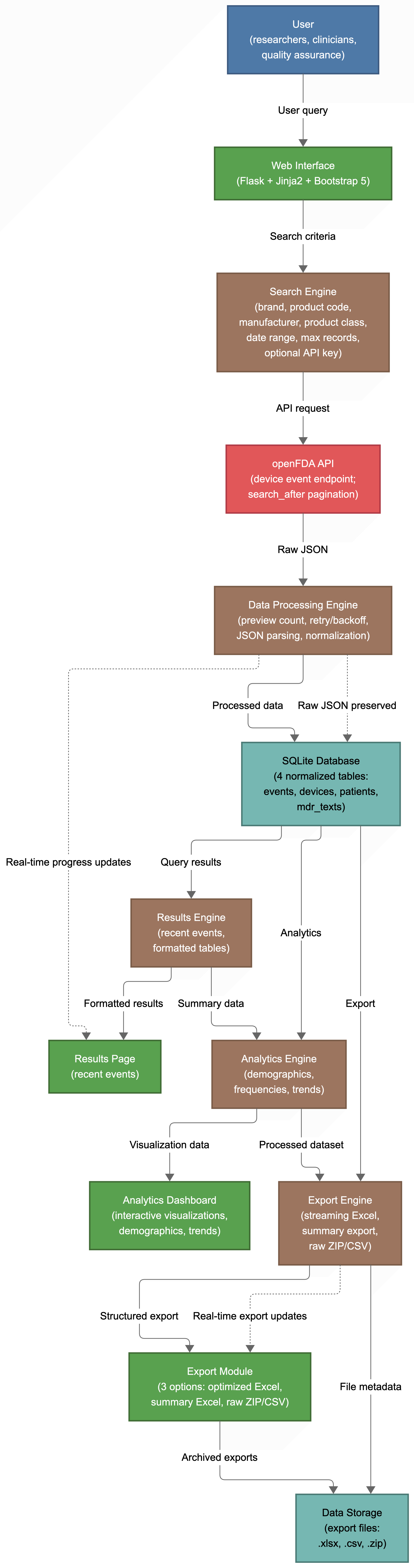
Figure 1: Complete workflow showing data extraction, processing, and export capabilities
- Responsive Design: Works on desktop, tablet, and mobile
- Bootstrap 5 Framework: Modern, accessible UI components
- Micro-interactions: Subtle hover effects and animations
- Intuitive Navigation: Clear, consistent user experience
- Professional Styling: Clean, medical-grade interface
- Modern Multi-Select Filters: Interactive dropdowns with checkboxes and search (Choices.js) for analytics filtering
- User-Friendly Feedback: Clear status messages and loading indicators
- Flask Backend: Python-based web framework
- SQLite Database: Local data storage and caching
- openFDA API Integration: Direct FDA data access with API Key authentication
-
Advanced Pagination: Implements
search_afterfor robust large-scale data extraction - Pandas Processing: Advanced multi-dimensional data manipulation
-
Excel Export: Memory-safe
openpyxlstreaming architecture (write_only mode) with$O(1)$ lookup strategies to prevent Out-Of-Memory (OOM) failures on massive arrays - Docker Support: Easy deployment and containerization
- Electron Shell: Wraps the app for native desktop delivery across Mac and Windows
See the GitHub repository for screenshots!

Free · Takes 1 minute · Doubles your extraction speed
MAUDEMetrics works out of the box without any account or key. However, registering for a free FDA API key is strongly recommended because it:
| Without API Key | With API Key | |
|---|---|---|
| Records per batch | 500 | 1,000 |
| Extraction speed | Standard | ~2× faster |
| Rate limits | Stricter | More lenient |
- Visit open.fda.gov/apis/authentication/
- Click Get API Key and enter your name and email address.
- Check your inbox — your key arrives instantly.
- Paste it into the FDA API Key field in the MAUDEMetrics search form before clicking Extract.
Your key is stored only in the app's search form and is never transmitted anywhere other than directly to the FDA API.
The desktop app above is the recommended way for most users. The options below are for advanced users who prefer Docker or a manual Python setup.
# 1. Clone the repository
git clone https://github.com/MohamedMaroufMD/MAUDEMetrics.git
cd MAUDEMetrics

# 2. Build and run with Docker
docker compose up --build

# 3. Open your browser
open http://localhost:5005Note: Requires Python 3.11. Newer versions (e.g., Python 3.13) are not yet supported by all dependencies.
# 1. Create a virtual environment
python3.11 -m venv venv
source venv/bin/activate   # Windows: venv\Scripts\activate

# 2. Install dependencies
pip install -r requirements.txt

# 3. Run the app
python app.py
Then visit http://localhost:5005 in your browser.
-
Search Setup: Enter search criteria in any combination:
- Brand Name(s): e.g., "MiniMed 670G, Endurant II"
- Product Code(s): e.g., "MAF, KYF, MND"
- Manufacturer(s): e.g., "Medtronic, Abbott"
- Product Class(es): e.g., "pacemaker, defibrillator, stent"
- Date Range: Select start and end dates
- FDA API Key (Recommended): Get a free key from open.fda.gov and paste it in for 2x faster extraction.
-
Execute Search: Click Extract MAUDE Data
-
Review Results: View recent events (last 50) in the browser or export for analysis
-
Export Data: Choose between:
- Optimized Data: Professional Excel file with formatted Events sheet
- Raw Data (Fast): ZIP file with 5 CSV files in original API structure
- Summary Statistics (Fast): Standalone Excel file with analytical summaries
- Optimized Data Export: Professional Excel file containing:
- Events Sheet: Comprehensive processed and cleaned event data with integrated MDR texts
- Raw Data Export (Fast): ZIP file containing 5 CSV files in original API structure:
Events.csv- Main event data (report numbers, dates, flags)Devices.csv- Device information (brand names, product codes, manufacturers)Patients.csv- Patient demographics (age, sex, weight, outcomes)MDRTexts.csv- Narrative reports (problem descriptions, manufacturer narratives)RawJSON.csv- Complete original API responses
- Summary Statistics Export (Fast): Standalone Excel file containing statistical summaries, demographics, and analytics
- Consistent Date Format: All dates formatted as mm/dd/yyyy
- Professional Styling: Clean, readable .xlsx formatting
- Multiple Formats: Excel (.xlsx) and CSV options
- Data Validation: Ensures data integrity and compatibility
- Performance Optimized: Bypasses memory exhaustion (OOM crashes) on massive datasets (50k+ records) by utilizing instantaneous zero-DOM XML streaming and chunked database cursors.
This application interacts with the openFDA API.
See the fields reference for available data fields.
- Flexible Matching: Case-insensitive partial matching
- Multiple Terms: Support for comma-separated values
- Wildcard Support: Automatic wildcard expansion for partial matches
- Date Range Filtering: Precise date-based filtering
MAUDEMetrics retrieves data exclusively through the official openFDA API (https://api.fda.gov/device/event.json), the FDA's own platform created specifically for programmatic public access to its datasets.
| Topic | Details |
|---|---|
| Data license | All MAUDE data served by openFDA is released under Creative Commons CC0 1.0 Universal — equivalent to public domain. Unrestricted use, redistribution, and commercial application are permitted without attribution. |
| Access method | Only documented, publicly accessible API endpoints are used. No authentication-protected endpoints are accessed. No web scraping is performed. |
| Rate-limit compliance | The tool respects openFDA's published rate limits. An optional FDA-issued API key is supported for higher-volume use (see FDA API Key). |
| Pagination | The cursor-based search_after pagination used by MAUDEMetrics is an officially documented openFDA API feature, not a circumvention of access controls. |
| openFDA Terms of Service | https://open.fda.gov/terms/ |
The application includes comprehensive testing to ensure reliability:
# Run basic functionality tests
python -m pytest tests/  # If pytest is available

# Manual testing checklist:
# 1. Search functionality with various parameters
# 2. Data export in Excel format
# 3. Analytics dashboard visualization
# 4. Database operations and caching
# 5. Docker container deployment- All FDA data is validated against openFDA API specifications
- Date formats are standardized across all exports
- Text sanitization prevents injection attacks
- Database integrity is maintained through proper schema design
- Tested with datasets up to 10,000 records
- Optimized for responsive web interface
- Efficient database queries with proper indexing
- Memory usage optimization for large datasets
Q: How do I install the desktop app?
A: Download the installer for your platform from the Releases page. On macOS, open the .dmg and drag the app to Applications. On Windows, run the .exe installer and follow the prompts.
Q: macOS says "unverified developer" or "damaged app" — is it safe?
A: Yes. MAUDEMetrics is free and open-source. macOS shows this warning for any app not distributed through the App Store or signed with a paid Apple certificate. See the Installation Steps section above for the exact fix for your warning type.
Q: My antivirus (McAfee, Norton, Windows Defender) is blocking or deleting the app on Windows — is it safe?
A: Yes, this is a known false positive. Antivirus programs sometimes flag independently packaged open-source apps. The app is fully open-source and you can inspect every line of code in this repository. To fix it, restore maudemetrics.exe from your antivirus quarantine and add it as an exception. See the Windows Installation Steps above for platform-specific instructions.
Q: How does auto-update work?
A: The desktop app checks GitHub Releases each time it launches. If a newer version is found, it downloads in the background and prompts you to restart and install — no manual re-downloading needed.
Q: Docker won't start or port is in use?
A: Make sure port 5005 is free, or change the port in docker-compose.yml.
Q: The export is empty or missing data?
A: Ensure you have run a search and that the FDA API is available.
Q: Why was my export interrupted?
A: Previously, very large datasets (>10,000 records) could consume significant memory and crash the application. MAUDEMetrics has since been upgraded with a zero-DOM streaming export engine. It now easily writes enormous datasets (e.g., 50,000+ records) directly to disk sequentially, meaning memory exhaustion is incredibly rare. If your connection is interrupted, check your FDA API key and your container logs.
Q: How do I reset the database?
A: The application automatically clears all database tables on each launch and begins a fresh start every time you submit a new search. There is no longer a need to manually clear the data.
Q: Where can I get an FDA API Key?
A: You can register for an API key for free at open.fda.gov/apis/authentication/.
Q: Can I search for multiple manufacturers at once?
A: Yes, separate multiple manufacturers with commas (e.g., "Medtronic, Abbott").
Q: Are search results case-sensitive?
A: No, all searches are case-insensitive with partial matching.
Q: How are dates formatted in exports?
A: All dates are consistently formatted as mm/dd/yyyy across all sheets.
Q: What makes the Events sheet special?
A: It's the premium "golden sheet" (exported via Optimized Data) with professional formatting, smart column organization, integrated MDR texts, and optimized performance for the best user experience.
Q: How do I cite this software?
A: Please cite the companion preprint: Marouf et al. (2026). MAUDEMetrics: An Open-Source Framework for Automated FDA MAUDE Data Extraction and Reproducible Device Safety Research. Research Square. https://doi.org/10.21203/rs.3.rs-9990811/v1. For the software archive, see the Zenodo DOI badge above. Full citation metadata is available in CITATION.cff.
We welcome contributions from the community! This project follows standard open-source development practices.
- Fork the repository on GitHub
- Create a feature branch from the main branch
- Make your changes with clear commit messages
- Test your changes to ensure they work correctly
- Submit a pull request with a description of your changes
# Clone the repository
git clone https://github.com/MohamedMaroufMD/MAUDEMetrics.git
cd MAUDEMetrics

# Create a virtual environment
python3.11 -m venv venv
source venv/bin/activate  # On Windows: venv\Scripts\activate

# Install dependencies
pip install -r requirements.txt

# Run the development server
python app.py- Follow PEP 8 Python style guidelines
- Use meaningful variable and function names
- Add comments for complex logic
- Include docstrings for functions and classes
Before submitting a pull request, please:
- Test the application locally
- Ensure all features work as expected
- Check that the Docker build works correctly
When reporting issues, please include:
- Operating system and version
- Python version
- Steps to reproduce the issue
- Expected vs actual behavior
- Any error messages or logs
For feature requests, please describe:
- The problem you're trying to solve
- How the feature would help
- Any specific requirements or constraints
- This project is licensed under the Apache License 2.0. See the LICENSE file for details.
- For data licensing, API terms, and compliance information, see LEGAL.md.
- openFDA API for device event data
- Flask community for documentation and support
- Bootstrap for modern UI components
- Pandas for data processing capabilities
- Electron for cross-platform desktop packaging
For questions, suggestions, or support, please open an issue on GitHub.