


- Saumil Shah Mechanical Engineer, Innovator, Robotics Graduate Student at UMD.
- Naman Gupta Grad Student at University of Maryland, pursuing M.Eng. in Robotics.
- Aman Virmani Masters student in Robotics at University of Maryland pursuing opportunities in Computer Vision and Deep Learning
Object detection is necessary branch for robotics, especially autonomous robots. In order to navigate a robot in the real world, it is necessary to create a perception of the surrounding in robot’s reference frame. Human detection is a vital problem in the field of object detection. It is absolutely essential for a robot to detect and avoid human obstacles for the safety of people in the working environment of the robot. Plethora of work has been done to solve the problem of human detection. Color based approaches don’t perform well for varying lighting conditions. Although deep learning approaches provide state of the art results, but they require too much computational power. We plan to use HOG feature based approach for this module, because it provides good results and is computationally efficient.
We have designed a module, for the ACME Robotics, to detect the positions of humans around the robot. The module works by taking an image and processing it to produce rectangular bounding regions around the detected humans in the environment. The pixel coordinates of the bounding boxes can then be to track the location of human with respect to the robot’s frame of reference. Such a system will help in human obstacle detection and avoidance when the robot is navigation in the real world.
In order to implement this module, a dataset with set of images containing humans (positive images) and a set not containing humans (negative images) is needed. We plan to use INRIA Person Dataset. First, Histogram of oriented gradient (HOG) features will be calculated for each of the image. These HOG vectors will then be used as input to train the Support Vector Machine classifier to detect the location of humans in each image. The output of the SVM is compared to the ground truth labels and the error is then fed back to train the classifier. This trained classifier can then be used for real time estimation of human’s position. Training feature will be provided with the module so that it can be improved over time with adding more training data.
We have used openCV 3.3.0 as a third party library, which is covered under the 3-clause BSD License.

Fig. 1. Shape features computed at local image regions. (a) HOG. Red arrows represent the gradients. (b) Shape context of a point (in red) paper
HOG features are not scale invariant. Normalising the HOG feature vectors will enable our method to be used in cases of scale variation.
HOG features are not rotation invariant. Training the SVM on images with humans in different poses and orientation may fix that limitation.
Since RGB cameras don’t perform in low light conditions it might cause trouble. The module is robust enough to work with infrared cameras in low light conditions.
We’ll be using Agile Development Process and quality will be ensured by unit testing, valgrind debugging and cppcheck. Test Driven Development will be used. It is a software development process that relies on the following sequence: Add a test-> Run all tests and see if the new one fails-> Write some code-> Run tests-> Refactor code-> Repeat.
- Ubuntu 16.04 (Operating System)
- Modern C++ (Programming Language)
- CMake (Build System)
- OpenCV library (new BSD License)
- Math library (new BSD License)
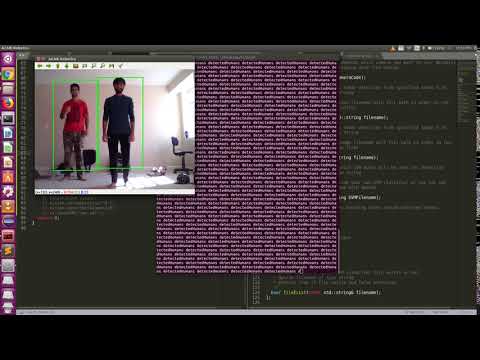
Please find the video output with laptop camera. You can find the custom model trained for this project here
The positive train Images must of the size 96X160 with human being at center of the image. Code will crash for image size less than that.
We plan to fix this bug in next version.
Install OpenCV 3.3.0 and other dependencies using the following commands. For further information, refer here
source ./dependencies.sh
MIT License

Copyright (c) 2019 Saumil Shah, Aman Virmani, Naman Gupta

Permission is hereby granted, free of charge, to any person obtaining a copy
of this software and associated documentation files (the "Software"), to deal
in the Software without restriction, including without limitation the rights
to use, copy, modify, merge, publish, distribute, sublicense, and/or sell
copies of the Software, and to permit persons to whom the Software is
furnished to do so, subject to the following conditions:

The above copyright notice and this permission notice shall be included in all
copies or substantial portions of the Software.

THE SOFTWARE IS PROVIDED "AS IS", WITHOUT WARRANTY OF ANY KIND, EXPRESS OR
IMPLIED, INCLUDING BUT NOT LIMITED TO THE WARRANTIES OF MERCHANTABILITY,
FITNESS FOR A PARTICULAR PURPOSE AND NONINFRINGEMENT. IN NO EVENT SHALL THE
AUTHORS OR COPYRIGHT HOLDERS BE LIABLE FOR ANY CLAIM, DAMAGES OR OTHER
LIABILITY, WHETHER IN AN ACTION OF CONTRACT, TORT OR OTHERWISE, ARISING FROM,
OUT OF OR IN CONNECTION WITH THE SOFTWARE OR THE USE OR OTHER DEALINGS IN THE
SOFTWARE.
Agile iterative process is being followed for project. The roles were divided into driver, navigator and design keeper, which were shuffled as per tasks. You can find all the logs here. Sprint planning and review notes are here.
sudo apt-get install lcov
cmake -D COVERAGE=ON -D CMAKE_BUILD_TYPE=Debug ../
make
make code_coverage
With the following steps you can clone this repository in your local machine and build it.
git clone --recursive https://github.com/SaumilShah66/ENPM808X-Human-Obstacle-Detection
cd ENPM808X-Human-Obstacle-Detection
mkdir build
cd build
cmake ..
make
With following commands you can run tests and demo of this module.
Run tests: ./test/detect-test
Run program: ./app/detect
To install doxygen run the following command:
sudo apt-get install doxygen
Now from the cloned directory run:
doxygen doxygen
Generated doxygen files are in html format and you can find them in ./docs folder. With the following command
cd docs
cd html
google-chrome index.html