




Your own AI workforce, running on your own machine.
OpenCompany is an open-source, self-hosted canvas for AI agent workflows — think n8n, built agent-first. Drag, drop, and connect AI agents to your email, calendar, messages, browser, phone, and 30 other services, with 132 nodes across 27 categories to build from. No code required. No subscription. No usage limits. Bring your own API keys, or run models locally with Ollama / LM Studio for free.
Prerequisites: Node.js 22+, Python 3.12
npm install -g @zeenie-ai/opencompany
company start
Open http://localhost:5678 and click the key icon (API Credentials) in the toolbar to connect your first AI provider.
Run from source (for contributors)
npm install -g pnpm
git clone https://github.com/zeenie-ai/OpenCompany.git OpenCompany
cd OpenCompany
pnpm run build
pnpm run dev
The dev task starts the Vite client (with HMR) at http://localhost:5678 — the same URL as production — proxying API/WebSocket traffic to the Python backend on :5679; optional daemons (WhatsApp, Temporal) are spawned by the backend on demand. Every port is declared in .env.template and overridable in .env; nothing is hardcoded. See SETUP.md and SCRIPTS.md for details, and CONTRIBUTING.md for the codebase map and contribution recipes.
Upgrading from MachinaOS? Existing ~/.machina and checkout-local .machina state is detected when the new .opencompany location does not yet exist, so databases and deployment state are not stranded. The machina command remains available as a deprecated legacy alias; new scripts should use company.
Hello-world setup, end to end ↓
Hello_World_Tutorial_github.mp4
AI building itself for complex tasks ↓
Agent_Builder.mp4
Multiple specialized loop agents orchestrating ↓
AI_COMPANY.mp4
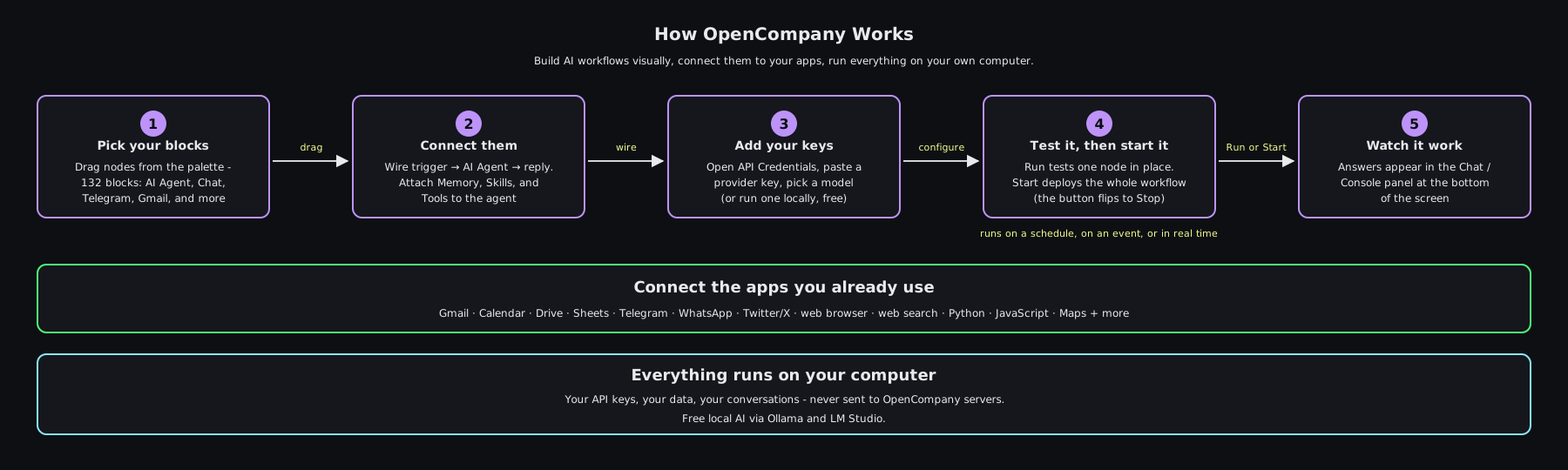
Pick nodes from the palette, drag them onto a canvas, connect them with lines, and give your AI agent some memory and skills. Press Run on a node to test it in place, or press Start to deploy the whole workflow as a durable background listener — waiting for emails, responding to messages, checking in on a schedule, doing the work you'd rather not.
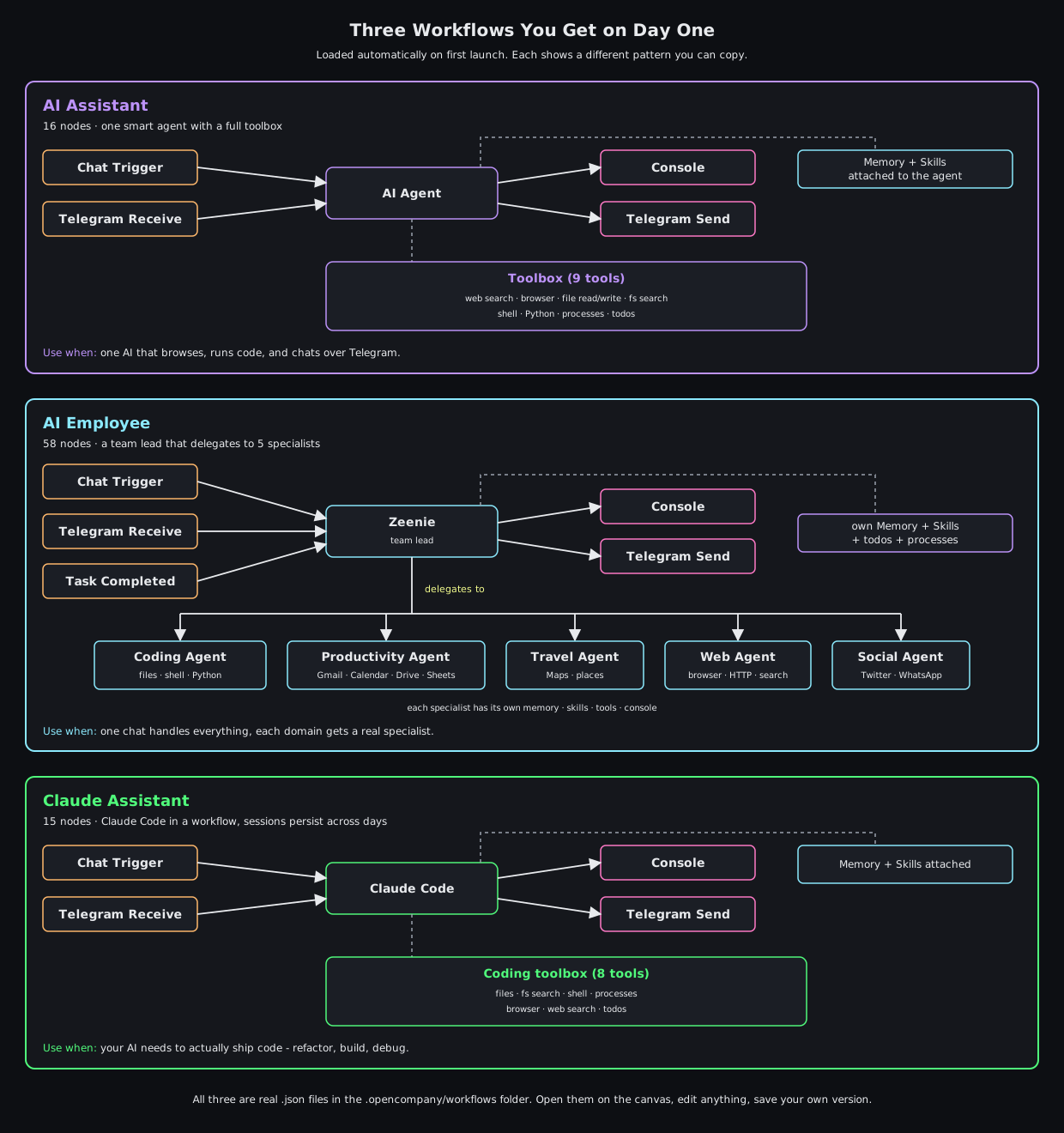
Three example workflows load automatically on first launch. Open them on the canvas to see exactly how the pieces fit together, then edit any node and save your own version.
- Personal AI assistants that remember. A chat assistant that knows your calendar, reads your inbox, and follows up on tasks. Conversations are saved as readable markdown you can edit; long-term memory uses vector search so years of context stay accessible.
- Durable agent teams. Hire an AI Employee or Orchestrator as a team lead, connect specialist agents through
input-teammates, and the lead assigns bounded work through its built-in Task Manager. Tasks are durably queued, run up to three descendants in parallel, require lead acceptance, and remain visible in the read-only Team Monitor. - Automations that run themselves. Recurring jobs ("every weekday at 9 AM, summarize my unread emails"), event-driven replies ("when a customer texts on WhatsApp, draft a response"), and multi-step background pipelines. Any workflow can also expose a live
/webhook/{path}HTTP endpoint that fires on GET, POST, PUT, DELETE, or PATCH. - Email, calendar, and document workflows. Send and search Gmail, manage Calendar, Drive, Sheets, Tasks, and Contacts. Read any inbox over IMAP (Gmail, Outlook, Yahoo, iCloud, ProtonMail, Fastmail, or custom servers) — including a polling trigger that fires a workflow on every new message.
- Messaging bots. Send and receive on WhatsApp (groups, contacts, newsletter channels), Telegram (bots with owner detection), and Twitter/X (post, reply, search). A unified social node normalizes incoming messages into one format so the same workflow handles them all.
- Phone control from a workflow. Pair your Android phone via QR code and control it from any agent: battery and network status, app launching, WiFi / Bluetooth / airplane toggles, camera, sensors, media playback — 16 device services.
- Web automation and research. An interactive browser with accessibility-tree navigation (click, type, screenshot); an alpha harness that drives your real Chrome over CDP; scraping with Crawlee and Apify actors (Instagram, TikTok, LinkedIn, Facebook, YouTube, Google Search); search via DuckDuckGo (free), Brave, Serper, and Perplexity; residential proxies with geo-targeting and rotation.
- Code, deploys, and pull requests. Run Python / JavaScript / TypeScript in per-workflow sandboxed workspaces, keep dev servers alive with the Process Manager node (output streams to the Terminal tab), open and merge PRs with the GitHub node, and ship with the Vercel node — both can authenticate through their own CLIs, no token pasting required.
- Payments. Stripe action node (charges, subscriptions) plus a signed-webhook receiver for reacting to payment events in real time.
- Your own knowledge base. RAG out of the box: parse PDFs and HTML, chunk, embed locally or via OpenAI, store in ChromaDB / Qdrant / Pinecone, query from any agent.
| Provider | Notes |
|---|---|
| OpenAI | GPT-5.6 Sol / Terra / Luna (+ Pro variants), GPT-5.5, GPT-4.1 |
| Anthropic | Claude Opus 5, Fable 5, Sonnet 5, Opus 4.8 / 4.7 — with extended thinking |
| Gemini 3.6 / 3.5 Flash, 3.1 Pro — with reasoning budgets | |
| xAI | Grok 4.20, 4.20 multi-agent, 4.3 — selectable from any agent |
| DeepSeek | DeepSeek V4 Flash / Pro |
| Kimi | Kimi K3 |
| Mistral | Mistral Large / Medium / Small, Codestral |
| Groq | GPT-OSS-120b and more (ultra-fast inference) |
| Cerebras | GPT-OSS-120b (custom AI hardware) |
| Sarvam | Indic-first models (sarvam-105b, 128K context) |
| OpenRouter | 200+ models via one unified API |
| Ollama | Run any local model on your machine — free, private, offline |
| LM Studio | Run any local model with a desktop app — free, private, offline |
Every provider talks to its vendor SDK directly through a native layer — no translation wrapper in between. xAI is the one provider without a standalone chat-model node; it is chosen from the agent's own provider dropdown, which is why there are 13 providers but 12 nodes.
Local providers (Ollama, LM Studio) are first-class — context length is detected automatically from your running server (LM Studio additionally reports vision and tool-use capability). No paid API needed.
| Agent | Specialized for |
|---|---|
| AI Agent / Chat Agent | The general-purpose agents most workflows start from |
| AI Employee / Orchestrator | Team leads that coordinate other agents |
| Android Agent | Phone control |
| Web Agent | Browser automation, scraping, search |
| Coding Agent | Writing and running code (Python / JS / TS) |
| Productivity Agent | Gmail, Calendar, Drive, Sheets, Tasks, Contacts |
| Social Agent | WhatsApp, Telegram, Twitter messaging |
| Task Agent | Scheduling, reminders, cron jobs |
| Travel Agent | Maps, location lookup, planning |
| Payments Agent | Stripe + financial workflows |
| Consumer Agent | Customer support, order management |
| Claude Code Agent | Anthropic's Claude Code CLI for advanced coding sessions |
| Codex Agent | OpenAI Codex CLI integration |
| RLM Agent | Recursive Language Model — write code that calls itself recursively |
| Autonomous Agent | Code-mode loops that reduce token usage 80-98% |
| Tool Agent | General-purpose tool orchestration |
| Vertex Agents | Google Vertex managed agents, plus an admin node for their lifecycle |
The Claude Code agent keeps warm interactive sessions in a pool (same session across turns, automatic resume after a crash) and runs on interactive billing — a Claude subscription login works instead of per-token API cost. The Codex agent sandboxes parallel tasks in git worktrees.
Skills are short markdown files that teach an agent how to do something well — when to use which tool, what arguments to pass, common mistakes to avoid. Edit them in the UI; changes apply immediately. 73 ship built in across 18 folders, covering Android control, Google Workspace, social messaging, web research, coding, terminal use (Bash, PowerShell, WSL, Nushell), payments, deployment, and more — and you can drop your own into .opencompany/skills/, where they override the built-ins of the same name.
Agents connected to a memory node can track normalized token usage and compact long conversations as they approach the model's context limit (80% by default). Compaction is a context-pressure control, not an agent termination rule: the shared native LLM layer asks the selected model for a five-section summary — Task Overview, Current State, Important Discoveries, Next Steps, Context to Preserve — and continues from that summary. Provider-reported usage is aggregated across an agent loop; session token and cost metrics are persisted on the memory-connected in-process path, while durable Temporal runs return their aggregate usage in the execution result.
Memory-connected agent runs calculate USD cost from provider-reported usage when that usage is available. See tracked spend in the API Credentials panel, and configure pricing in pricing.json for custom model pricing. This is not a universal audit log of every LLM or third-party API request.
- Durable execution via Temporal. Ordinary node and agent-support activities retry transient failures with bounded backoff; billed
AgentWorkflowLLM-step activities run once to avoid automatic double billing after ambiguous failures. Cron schedules have a 24-hour catch-up window so missed ticks backfill, and per-queue worker pools scale horizontally. Falls back to a local executor when disabled. - Credentials encrypted at rest. API keys and OAuth tokens live in a separate
credentials.db, encrypted with Fernet (AES-128-CBC + HMAC-SHA256) and a PBKDF2-SHA256 key at 600,000 iterations. Nothing leaves your machine. - Login-gated by choice. Runs open on localhost by default; flip on single-owner JWT auth (or multi-user mode) for shared and cloud deployments —
company deployenables it automatically.
- 12 visual themes — light, dark, Renaissance, Greek, Edo, Steampunk, Atomic, Cyber, Wasteland, Rot, Plague, Surveillance — each with its own icon set, sound pack, and decorative ornaments. Animations honor
prefers-reduced-motion. - Drag-to-map outputs from one node's output directly onto another's input fields.
- Live execution animations — nodes glow while running, AI agents show iteration counts, errors surface inline.
- Chat + Console panel — a resizable bottom panel with a chat pane for talking to trigger nodes, plus Console and Terminal tabs for logs and live process output.
- Component palette with search, categories, and a Normal/Dev mode toggle that hides advanced nodes when you don't need them.
- 4-step onboarding wizard for first-time users, replayable any time from Settings.
Want to add a node, LLM provider, skill, or integration? One Python file = one node. The backend owns all the schemas; the frontend renders from them automatically. No frontend code required for most extensions.
- CONTRIBUTING.md — codebase map, architecture diagrams, contribution recipes
- server/nodes/README.md — 5-minute plugin recipe + folder map
- docs-internal/ — deep-dive architecture docs (execution engine, Temporal, LLM layer, credentials, event system, performance, build pipeline)
- CLAUDE.md — comprehensive project memory (great for AI-assisted contributions)
- Hosted docs: https://docs.opencompany.sh/
- DeepWiki: https://deepwiki.com/zeenie-ai/OpenCompany
Issues and pull requests are welcome. CONTRIBUTING.md has the fork/branch/PR workflow, the repository map, and recipes for adding a node, LLM provider, or skill.
One note on scope: connector and provider lists are kept deliberately narrow. The Apify node runs any actor through its custom option, and agents reach any OpenAI-compatible endpoint through the existing provider path — so a new first-class preset needs a reason beyond "my service could be in the dropdown too."
Discord — the fastest way to get help, request features, and follow design discussions.
MIT — © 2025 MachinaOs, © 2026 OpenCompany contributors.