
 1:1 & 1:N Windows .NET Demo for Face Recognition, Liveness Detection.
- Global Coverage ID Card/Passport OCR Mobile Demo and ID Document Recognition Server Demo.
- Try 1:N Face Search through our Face Identification Web Demo.
- Subscribe our Free APIs for your app or website from our API Hub.
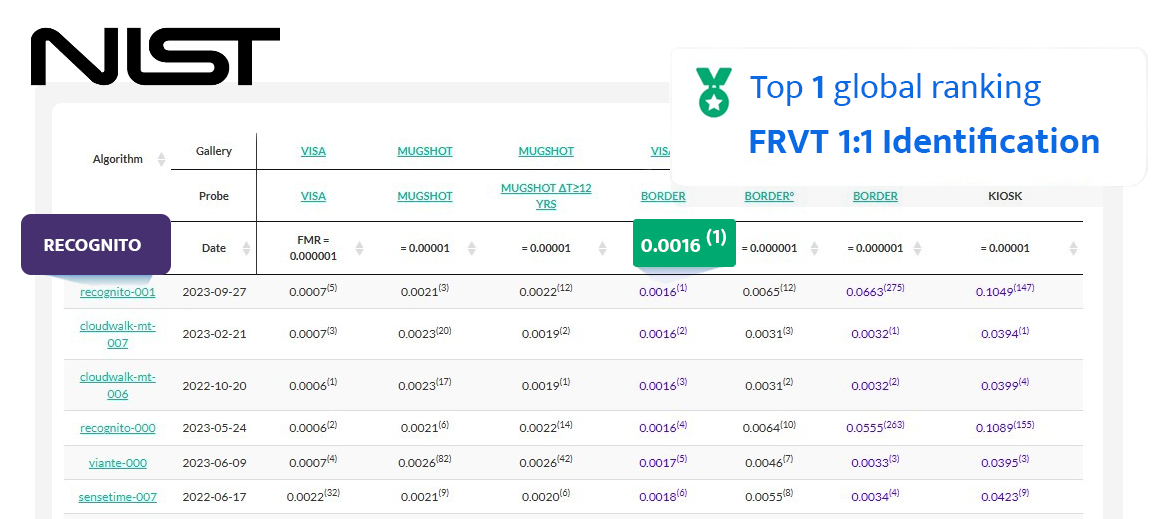
This repository contains a demonstration of Recognito's face recognition SDK for Flutter. The SDK includes advanced features such as face recognition, liveness detection, and pose estimation. Recognito's face recognition algorithm has been ranked as the Top 1 in the NIST FRVT (Face Recognition Vendor Test).
Our Product List for ID verification.



- Face Recognition: Identify and verify individuals by comparing their facial features.
- Liveness Detection: Determine whether a face is live or spoofed to prevent fraud in authentication processes.
- Pose Estimation: Estimate the pose of a detected face, including Yaw, Roll, Pitch
- NIST FRVT Top 1 Algorithm: Utilize the top-ranked face recognition algorithm from the NIST FRVT for accurate and reliable results.
- On-premise: Operate entirely within your infrastructure, ensuring data privacy and security.
- Real-time: Perform face recognition, liveness detection, and pose estimation with minimal latency.
- Fully-offline: Function without the need for an internet connection, ensuring reliability and data privacy.


Recognito Youtube Channel: youtube.com/@recognito-vision


To use the Recognito SDK in your Flutter project, follow these steps:
-
Add
facesdk_pluginpackage to dependencies inpubspec.yamlfile.
-
Import
facesdk_pluginpackage in dart files.
-
Add
libfacesdktosettings.gradleinandroidfolder.
-
iOS SDK
facesdk.frameworkis already included in thefacesdk_pluginpackage, so you don't need to download and import it into your project.
- For project setup, run the following commands:
flutter pub get
-
For trial license, share your application ID and bundle ID
-
Initialize SDK with license.
  try {
  if (Platform.isAndroid) {
    await _facesdkPlugin
        .setActivation(
            "EO5wcxhdMXJoLRpKq3Lexv2sTHPU8Ehed3vsBwmzdye/MJw+rVJTnY9SidD3vKV/2YNE6kufwIcC"
            "7LvLGFSORk3b14swPe7415aYSLKNI2RaUL5Nfn9oWHBjW1XehQLjLUx3w0Qi8bUth6vyg9Oaj7V7"
            "+dKruxjx/2dD2ddXKBoiIwYDonjW7gx7PmF9W66DXDtfRGpARvKW5Cn+jSCCH8A3Gft8wOBdQXM8"
            "UTDZUZxNbvozkgV6Dw9hMQJSka06iFK1h/UO6NrGLudt1SOC2b3hfoFJcAVjl3W7UTxzVyByJpLp"
            "tYTWJNr36pn1ixWhazLHC4s4TXtyQR67yzN3aw==")
        .then((value) => facepluginState = value ?? -1);
  } else {
    await _facesdkPlugin
        .setActivation(
            "H/Fs6Zgbsi9av6VVDAi54yqpYxnq0eDV3MSZAxMnARvUVePNY85UJu3d95nM7iO2RrCm19/eq+qb"
            "gSDmhJRYVJBMEUcxG+0cPPWVAW7m46dfS1Kpn+Flqbanfbco+Hd9Uda3aAzDkklzgdfYt7TvSXRt"
            "LZ8wW7jLiPjt8Lufj1GvhRzfESARv18VrxfQV+U8x3EqqvfKTJrkkg91NuAKvUZSoao4B5pQLpRd"
            "GwQ/saP9AQSWuyU1Zw+Whw/cnmXY2xZLGx6n/ict3NW9vpttv2tBbPCe/TdofRuJbE7R1Yb60BvQ"
            "ajzoaQWx3RsRgca9ah+Pccxb15tPVzr1apTK7A==")
        .then((value) => facepluginState = value ?? -1);
  }

  if (facepluginState == 0) {
    await _facesdkPlugin
        .init()
        .then((value) => facepluginState = value ?? -1);
  }
} catch (e) {}
Initialization status codes:
Code Status 0 Activate SDK successfully -1 License Key Error -2 License AppID Error -3 License Expired -4 Activate Error -5 Init SDK Error

For any questions, issues, or feature requests, please contact our support team.






