This document covers a brief introduction to why the bot was built as well as what is required to make it work.
The bot was developed in response to a customer need to be able to record the multi-channel interactions on a Teams call. Recording a call is only one of the things that can be done with the media stream delivered to the bot. Therefore the bot as delivered in this repository is designed to be easy to extend and add functionality for various use cases. Please be aware that it is against the terms of use to record without informing all participants that the call is being recorded.
Examples of the types of use cases to which a bot can be applied include:
-
Responding to meeting process or content in real-time (e.g. a digital assistant delivering information to particiapants in a call)
-
Responding to the content of the call such as using Speech to Text and working with the text result for example a digital assistant
-
Enhancing call capabilities such as doing DTMF tone collection
-
Injecting content into calls, both audio and video
-
Converting the voice stream to text in near real-time
-
Passing the media to another service to do something like emotion detection in a call.
The bot was original built to support call recording. There are a number of recording options available to users of Teams shown below.
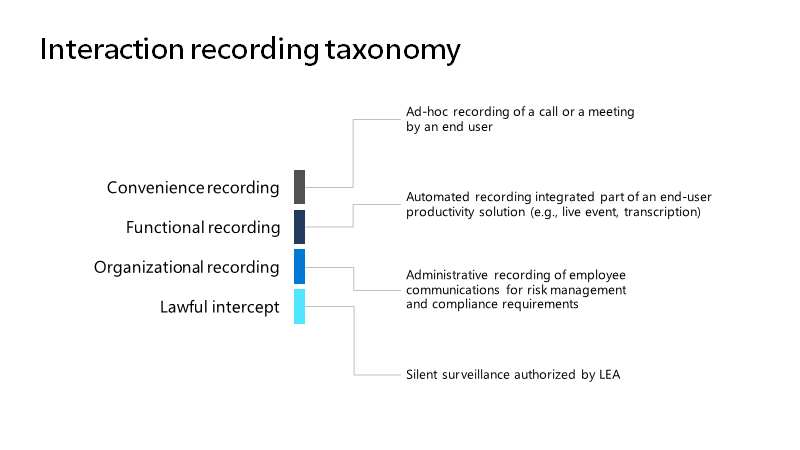
See original link here The details of how each recording approach is appropriate is contained in the article linked here.
The most flexible option for an end consumer is the policy based Organisational Recording option, also referred to as Compliance Recording. It is 'triggered' by a policy, attached to a user, that will include a bot into a meeting. The bot can then interact with the media stream. Policy based recording also makes it possible to display the recording banner as required in the terms of service for using the API with Teams.
The diagram illustrates the main components required for the bot:
-
The Teams client is incidental in the operation of the bot. It is used to start and join calls by users. It is also possible to commence and join calls using the [Graph API](Working with the communications API in Microsoft Graph - Microsoft Graph v1.0 | Microsoft Docs).
-
A channel is registered in the [Azure Portal ](Azure Bot Service | Microsoft Azure). This channel contains configuration and permission information for the bot application.
-
The Teams central infrastructure is where all Teams interactions occur. It is shown only for context, there is nothing to be done with the Teams infrastructure itself.
-
Users of Teams are managed from the Admin Portal
-
The channel registration contains an HTTPS url that will be the signalling endpoint which receives all notifications from Teams. This is what the bot listens to in order to join calls and recieve notifications from Teams
-
The bot itself is a .NET Framework application (C#) developed using the [Graph Communications SDK and API](Graph Communications Media SDK)
A bot is enabled for a call by means of a Bot Channel Registration in the Azure Portal. This lets Teams know that there is a channel that should be included and how to find it. The registration process includes nominating an HTTP webhook URL. This is the endpoint that will be called by Teams when a call starts. This registration process includes granting graph api permissions.

Each user that is covered by the recording requirement has a recording policy attached to them. The online documentation covers the process of creating and attaching the policy. There are also [instructions in this repository](./Documentation Outline TOC.md) that take you through the steps of doing this. The policy is what results in the media stream for a nominated user being sent to the bot (using the channel registered above).
The bot itself is developed in C# and has to run on a full Windows machine. This is due to the requirements of the media library SDK which require .Net framework to use.
The bot will most likely be deployed to a cloud based server, likely in a container. This however makes development and debugging cumbersome.
For local development purposes it is possible to use ngrok to act as the signalling and TCP media traffic endpoitn and have it redirected to your local machine. There are notes about how to setup this development environment in the repository.
The main asset delivered in this repo is a media receiving bot and associated documentation. The bot is joined into meetings via a Compliance Policy attached to a user. Once connected to a meeting/call a media stream is delivered to the bot and the bot can then do various things with that stream for example:
-
Persisting the stream and associated metadata to act as a meeting recorded
-
Use the content of the stream to connect to other services (like speech to text for near real-time transcription)
The bot as delivered here is intended to be a sample that can be a starting point for further development. To this end it is intended to be a base starting point and a 'skeleton' that can be built out on. It is also intended to be as flexible as possible so that it can be deployed in different ways.
The repo includes instructions on how to deploy the bot into Kubernetes. This is to support scaling requirements for when a lot of calls are being connected to. The deployment documentation also deals with how to scale the bot. It is a stateful application with potenitally long running processes (meetings and calls can be up to 24 hours in duration) therefore scaling the number of bots down must consider ongoing calls and letting them complete.
The repository contains the following items/code/information
-
Code for a general purpose media end point bot ('the bot')
-
Documentation on how to develop on, and, extend the bot
-
Guidance on how to deploy the bot for production use (in Kubernetes)
- Guest users cannot have a recording policy attached to them. The recording policy would have to be setup in their home Active Directory.
- Polocies can take time to propogate to users. Generally it is pretty quick but it can take hours for a policy to take effect.
- Every session that the user with the policy attends will by default be recorded.
- If the bot attached to the call crashes or leaves the meeting for whatever reason, the user with the attached policy relevant to that bot will also be removed from the meeting.