The StructBondModule submodule of PlutoExtras defines and exports functionality to easily create widgets for custom structure and combine multiple bonds together in a convenient floating side table.
!!! note
The StructBondModule is currently not re-exported by PlutoExtras so it has to be explicitly used with using PlutoExtras.StructBondModule
Open the structbond module notebook static html to see the look of the widgets exported.
Or open the related notebook directy in Pluto to check their functionality in action!
!!! note
The notebook must be run from the original folder (test/notebooks) within the PlutoExtras package folder to properly load the PlutoExtras package
Generating automatic widgets for custom structs is quite straightforward with
the aid of the @fielddata macro and the StructBond type.
The StructBond structure wraps another structure and generates a widget that can be used together with @bind to obtain instances of a custom structure.
In order to correctly display the widget, the description and widget associated to each field of the structure must be specified either.
This can be done either using @fielddata as in the example video below or by using the separate @fieldbond and @fielddescription separately.
<video controls=true>
<source src="https://user-images.githubusercontent.com/12846528/264639467-ecda1c22-141a-4297-98d7-0667d2e8d5a4.mp4" type="video/mp4">
</video>
Sometimes custom structs are not needed and it would be useful to just use the same nice bond structure of StructBond to simply create arbitrary NamedTuples.
This is possible with the convenience macro @NTBond which can be called as shown below to create a nice display for an interactive bond creating an arbitrary NamedTuple.
The macro simply create a StructBond wrapping the desired NamedTuple type.
<video controls=true>
<source src="https://user-images.githubusercontent.com/12846528/264640510-c605d3af-77c8-4752-9b80-8bc85545d566.mp4" type="video/mp4">
</video>
Since version v0.7.16, it is possible to PlutoUI.Experimental.transformed_value to transform the resulting value of the NamedTuple return by the @NTBond macro by either providing a third argument to the macro (acting on the full NamedTuple) or by using the @tv decorator directly when defining the bond for a specific field:
When calling the macro with a third argument, this is interpreted as a function that is used to create a bond transformation using PlutoUI.Experimental.transformed_value.
This means that the two expressions below yield the same result:
@NTBond "WoW" begin
	a = ("Description", Slider(1:10))
end x -> x.a + 2
and
PlutoUI.Experimental.transformed_value(x -> x.a + 2, @NTBond "WoW" begin
	a = ("Description", Slider(1:10))
end)
!!! note
The synthax accepting a function to transformed the resulting NamedTuple also has a convenience shorthand where _ can be used to represent the original bond value.
The above example could then also be written as:
```julia
@NTBond "WoW" begin
    a = ("Description", Slider(1:10))
end _.a + 2
```
For the use directly at field level, it is sufficient to use the @tv decorator in place of the bond widget directly, using the following form and as shown in the image below:
@tv transform_function widget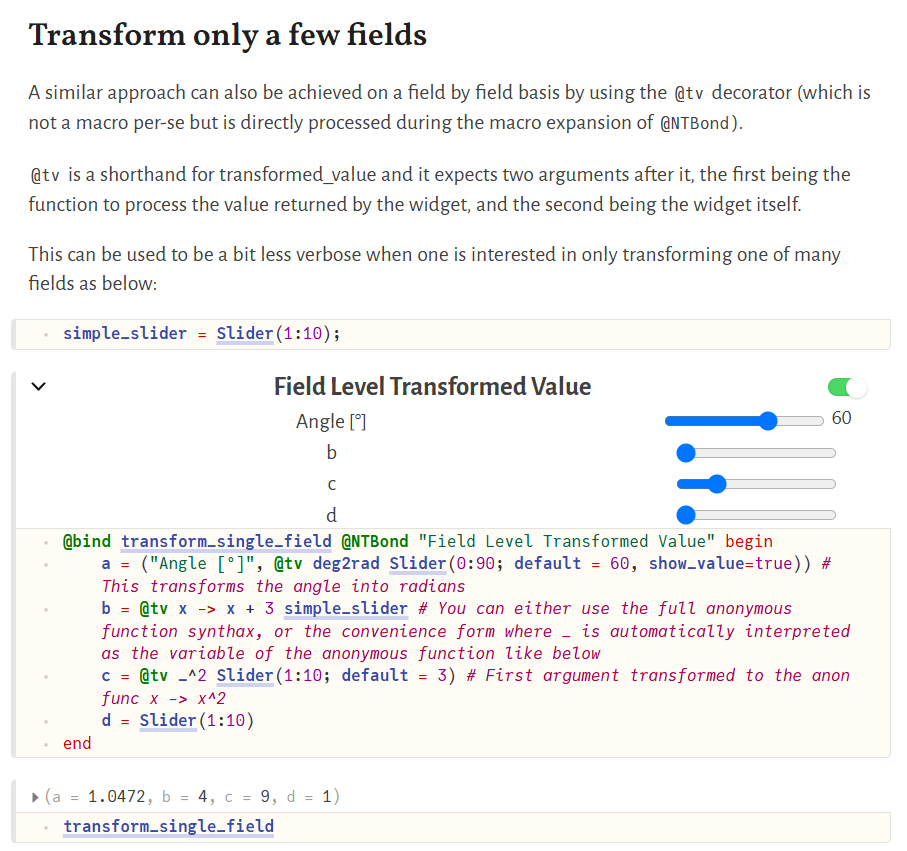
!!! note
The @tv decorator is not a macro actually defined within PlutoExtras, but is directly parsed during the macro expansion of @NTBond.
Sometimes, one wants to create a more complex binding where the number of parameters to control a bond can vary depending on some other variable. The StructBondSelect can be of help in some of these cases, by providing a way to select out of a number of arbitrary StructBonds (which include @NTBond) by using a dropdown to select the one to be displayed and used for generating the StructBondSelect widget's output.
This structure can be constructed with a vector of StructBond or transformed_value(f, ::StructBond) elements, and will take care of generating an appropriate widget to display and process only the selected one.
The main signature of the constructor is the following:
StructBondSelect(els::Vector; description = "StructBondSelect", default_idx = 1, selector_text = "Selector")The names to select upon will be taken from the description of the provided StructBonds, while the text displayed next to the selector will default to Selector but can be customized with the selector_text kwarg to the constructor.
The description kwarg can be used to customize the text in the widget container (similar to the same kwarg in StructBond and to @NTBond). Finally, the default_idx should be an integer and will select which of the provided StructBonds will be selected as default when instantiating the widget.
<video controls=true>
<source src="https://raw.githubusercontent.com/disberd/PlutoExtras.jl/assets/videos/structbond_select_example.mp4" type="video/mp4">
</video>
In some cases, one does not want to have a single bond wrapping either a Structure or a NamedTuple because single independent bonds are more convenient.
@BondsList is a convenience macro to create an object of type BondsList which simply allow to add a description to separate bonds and group them all together in a table-like format equivalent to those of StructBond.
!!! note
Unlike StructBond, a BondsList is already composed of bond created with @bind and it just groups them up with a description. The output of @BondsList is not supposed to be bound to a variable using @bind.
The bonds grouped in a BondsList still act and update independently from one another.
See the example below for understanding the synthax. The header of a BondsList is shown in an orange background to easily differentiate it from StructBond.
<video controls=true>
<source src="https://user-images.githubusercontent.com/12846528/264641605-7ab58c12-2c30-47c3-a93a-d64784c34a71.mp4" type="video/mp4">
</video>
The structures above can also be used nested within one another. To facilitate accessing nested structures, one can use the Popout type.
In its simple form, you can give an instance of a StructBond, a bond wrapping a StructBond or a BondsList as input to Popout to create a table that is hidden behind a popup window.
If an instance present, but you want a custom type for which you have defined custom bonds and descriptions with @fielddata to appear as popout, you can use the function popoutwrap(TYPE) to generate a small icon which hides a popup containing the StructBond of the provided type TYPE.
The StructBond table appears on hover upon the icon, can be made fixed by clicking on the icon and can then be moved around or resized. A double click on the header of the popout hides it again:
<video controls=true>
<source src="https://user-images.githubusercontent.com/12846528/264643126-cdf19078-70cb-46e2-aeb0-304a05ecf08a.mp4" type="video/mp4">
</video>
The ability to also wrap pre-existing bonds around StructBonds is convenient for organizing the various bonds one have in a BondsList or BondTable
As an example, one can create a BondsList containing the two StructBond bonds generated at the beginning of this notebook (the videos in the structbond section above) like in the following example:
<video controls=true>
<source src="https://user-images.githubusercontent.com/12846528/264645841-263f0cb3-ac79-4fe2-b66a-f8d5a4a70896.mp4" type="video/mp4">
</video>
The final convenience structure provided by this module is the BondTable. It can be created to group a list of bonds in a floating table that stays on the left side of the notebook (similar to the TableOfContents of PlutoUI) and can be moved around and resized or hidden for convenience.
The BondTable is intended to be used either with bonds containing StructBond or with BondsList. Future types with similar structure will also be added.
Here is an example of a bondtable containing all the examples seen so far.
<video controls=true>
<source src="https://user-images.githubusercontent.com/12846528/264646632-8c1b3eed-1adf-434b-925a-d57b99fc3c29.mp4" type="video/mp4">
</video>
StructBondModule.StructBond
StructBondModule.@fielddata
StructBondModule.@NTBond
StructBondModule.@BondsList
StructBondModule.popoutwrap
StructBondModule.BondTable
StructBondModule.StructBondSelect
StructBondModule.@fieldbond
StructBondModule.@fielddescription
StructBondModule.Popout
StructBondModule.@popoutasfield
StructBondModule.@typeasfield